
DevOps
Ansible Playbook Tutorial: Variables, Loops, Handlers, and Roles
Learn Ansible playbooks with runnable examples: variables, loops, handlers, and roles. Verified against ansible-core 2.21. Includes fixes for common errors.
An Ansible playbook is a YAML file that describes the state you want your servers to be in, and Ansible makes them match it. This Ansible playbook tutorial covers the four mechanisms that separate a playbook that merely runs from one you can maintain: variables, loops, handlers, and roles.
This tutorial targets ansible-core 2.21 (Ansible community package 14.x), the current stable release as of 2026-08-25. Everything below was checked against the official documentation for that version. Where behaviour changed in a specific release, the version is named in the sentence that describes it.
All package-management examples use Debian/Ubuntu (ansible.builtin.apt). The RHEL/Fedora equivalent is shown once, in the loops section, and then the article stays on apt so that no example silently contradicts another.
This tutorial assumes you already have Ansible installed and can reach at least one managed host over SSH. If you do not, the official installation guide covers that and this article picks up immediately after.
What is an Ansible playbook?
An Ansible playbook is a YAML file containing one or more plays, where each play maps a group of hosts to an ordered list of tasks, and each task calls a module that brings some part of the system to a described state. A playbook runs from top to bottom, and within each play, tasks run from top to bottom. Playbooks are the repeatable, reusable alternative to running ad-hoc commands by hand.
The property that makes playbooks safe to re-run is idempotency. Per the official documentation, most Ansible modules check whether the desired final state has already been achieved and exit without performing any actions if it has. Note the hedge: most, not all. Modules like ansible.builtin.command and ansible.builtin.shell run whatever you give them every time unless you constrain them with changed_when or creates. Assuming universal idempotency is a common and expensive mistake.
Playbook, play, task, and module
These four terms nest, and mixing them up makes every later explanation harder to follow.
| Term | What it is | In the file |
|---|---|---|
| Playbook | The YAML file itself | The whole document |
| Play | One host-selection plus the tasks to run on it | A top-level list item with hosts: |
| Task | One unit of work | An item under tasks: |
| Module | The code that does the work | The ansible.builtin.apt: key inside a task |
A playbook contains plays. A play contains tasks. A task calls exactly one module. When someone says “my playbook failed,” they almost always mean a task failed.
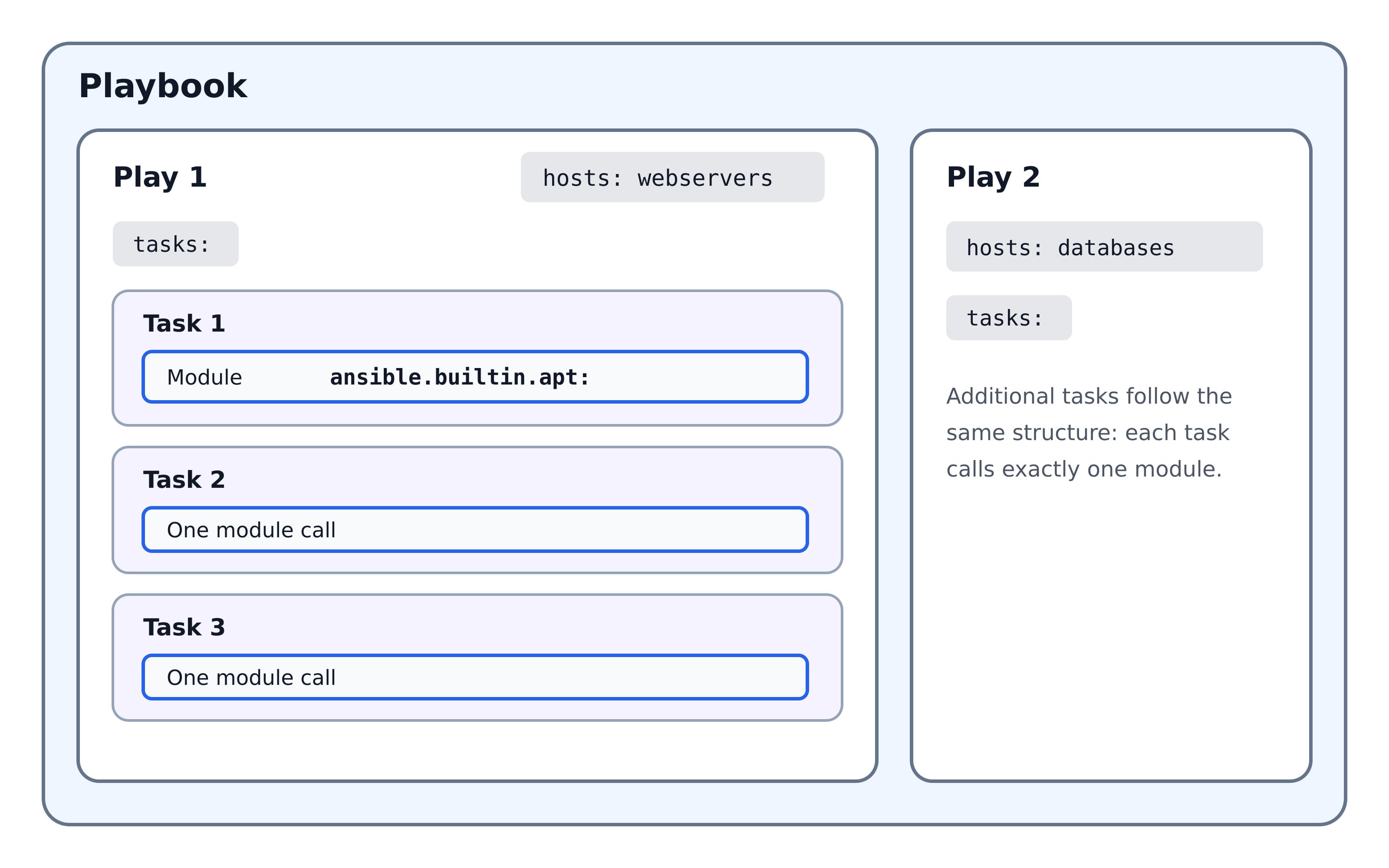
The playbook we’ll build
Here is the finished playbook, using all four concepts, before any of them are explained. Read it now to see the destination; each section below takes one mechanism apart.
This playbook installs and configures Nginx on Debian/Ubuntu hosts.
---
- name: Configure web servers
  hosts: webservers
  become: true

  vars:
    web_packages:
      - nginx
      - curl
    site_name: example.com
    worker_processes: 2

  tasks:
    - name: Install web packages
      ansible.builtin.apt:
        name: "{{ web_packages }}"
        state: present
        update_cache: true

    - name: Deploy the site configuration
      ansible.builtin.template:
        src: site.conf.j2
        dest: "/etc/nginx/sites-available/{{ site_name }}.conf"
        owner: root
        group: root
        mode: "0644"
      notify: Restart nginx

    - name: Enable the site
      ansible.builtin.file:
        src: "/etc/nginx/sites-available/{{ site_name }}.conf"
        dest: "/etc/nginx/sites-enabled/{{ site_name }}.conf"
        state: link
      notify: Restart nginx

    - name: Ensure nginx is running and enabled
      ansible.builtin.service:
        name: nginx
        state: started
        enabled: true

  handlers:
    - name: Restart nginx
      ansible.builtin.service:
        name: nginx
        state: restarted
Run it with:
ansible-playbook -i inventory.ini site.ymlFour things in that file are worth naming now, because they are the whole article:
- Nothing environment-specific is hardcoded in a task.
site_nameandweb_packageslive invars:. - The package task installs two packages without being written twice.
ansible.builtin.aptaccepts a list directly — which, as the loops section explains, is often better than a loop. - Nginx restarts only if a configuration file actually changed. That is
notifyplus the handler. - The whole thing can become a role so a second project can reuse it without copy-paste.
Versions and module names
Two version numbers matter in Ansible and they are not the same thing. ansible-core is the engine — the executables, the language and a small set of built-in modules. The ansible community package is a much larger bundle that pins one ansible-core release and adds several hundred collections on top. They are versioned separately, which is why ansible --version and ansible-playbook --version can report a number that looks nothing like the one you installed. This tutorial targets ansible-core 2.21, the release the community package 14.x depends on. The second half of this section explains why every module here is written in its fully qualified form, ansible.builtin.apt rather than plain apt — short names still work, but which collection they resolve to depends on configuration you may not control.
Which ansible-core version this tutorial targets
This tutorial targets ansible-core 2.21, which the Ansible community package 14.x depends on. As of 2026-08-25, ansible-core 2.21 is the current stable release, with 2.21.3 published on 2026-08-10.
ansible-core maintains a rolling window of three major releases. As of 2026-08-25 that window is:
| ansible-core | Community package | GA | Status |
|---|---|---|---|
| 2.21 | Ansible 14.x | 2026-05-31 | Current |
| 2.20 | Ansible 13.x | 2025-11-03 | Maintained |
| 2.19 | Ansible 12.x | 2025-07-21 | Maintained (security-only window) |
| 2.18 and earlier | — | — | End of life |
Check what you are actually running before you trust any tutorial, including this one:
ansible --versionThe first line reports the ansible-core version. If it reports 2.18 or older, you are outside the maintained window and some behaviour described here will differ.
Python requirements for ansible-core 2.21 are Python 3.12–3.14 on the control node and Python 3.9–3.14 on managed nodes. The control-node requirement is the one that catches people: a long-lived jump host on an older Python will refuse to run current ansible-core.
Everything in this article works on 2.20 as well. Three behaviours are version-gated and are called out where they appear: break_when requires 2.18 or later, role vars: scoping changed in 2.15, and conditionals must evaluate to a real boolean from 2.19 onward.
Why every module here is written as ansible.builtin.*
A fully qualified collection name (FQCN) identifies a module by its full path in the form namespace.collection.module_name. ansible.builtin.apt is the FQCN for the apt module.
Short names still work. apt: and ansible.builtin.apt: do the same thing, because content in the ansible.builtin collection is available by default without being listed anywhere. The official documentation nonetheless states that “in general, it is preferable to use a module or plugin’s FQCN over the collections keyword.”
The practical reason is collision. Once you install a few collections, more than one of them may ship a module called user or copy. A short name resolves through a search order; an FQCN does not need to resolve at all. The cost is verbosity, and that is a real cost in a long file — but it is the smaller of the two.
One trap worth knowing: roles you call from a playbook define their own collections search order and do not inherit the calling playbook’s settings, even if the role defines no collections keyword itself. A role that relies on the playbook’s search order will break when someone calls it from a different playbook. FQCNs inside roles avoid this entirely.
This article uses FQCNs everywhere, in every example, without exception.
Variables
An Ansible variable is a named value that a playbook substitutes at run time, so one playbook can serve many environments instead of existing as several near-identical copies. Without them, the difference between staging and production is a second copy of the file that slowly drifts out of sync with the first.
Values reach a play from several places: a play’s vars: block, files loaded with vars_files:, inventory group_vars/ and host_vars/ directories, a role’s defaults/ and vars/, facts gathered from the managed host, the output of an earlier task captured with register, and -e on the command line. When two sources define the same name, Ansible resolves the conflict with a fixed 22-level precedence order in which command-line -e wins and role defaults/ lose. The sections below cover each source in turn, then that precedence order, the YAML quoting rule that breaks more beginner playbooks than any other single mistake, and how to handle a variable that may not be defined at all.
Defining and referencing variables
Variables can be defined in a play’s vars: block, loaded from files with vars_files:, or supplied from inventory, roles, the command line, and about seventeen other places covered under precedence below.
References use Jinja2 double-brace syntax:
---
- name: Variable basics
  hosts: webservers
  become: true

  vars:
    app_user: deploy
    app_root: /srv/app

  tasks:
    - name: Create the application user
      ansible.builtin.user:
        name: "{{ app_user }}"
        state: present

    - name: Create the application directory
      ansible.builtin.file:
        path: "{{ app_root }}/releases"
        state: directory
        owner: "{{ app_user }}"
        mode: "0755"
The YAML quoting rule that breaks beginners’ playbooks
If a value starts with {{, the whole expression must be quoted, or YAML parsing fails before Ansible ever sees the task. The official documentation states the rule directly: “If you start a value with {{ foo }}, you must quote the whole expression to create valid YAML syntax.”
# Wrong — YAML reads the brace as the start of a dictionary
app_path: {{ base_path }}/22

# Correct
app_path: "{{ base_path }}/22"
The error is a YAML syntax error, not an Ansible error, which is why it confuses people — the message points at the file, not at the variable. The rule only applies when the value starts with the brace. app_path: /srv/{{ app_name }} is valid unquoted, though quoting it anyway costs nothing and removes the need to think about it.
Variable naming rules
Per the official documentation, a variable name can only include letters, numbers, and underscores, cannot begin with a number, and cannot be a Python keyword or a playbook keyword.
| Invalid | Why |
|---|---|
foo-port | Hyphen |
foo port | Space |
foo.port | Dot |
*foo | Asterisk |
async, lambda | Python keywords |
environment | Playbook keyword |
2nd_server | Begins with a number |
foo_port is fine. A leading underscore is legal and is a common convention for role-internal variables.
For nested data, prefer bracket notation. The documentation is explicit: “Bracket notation always works. Dot notation can cause problems because some keys collide with attributes and methods of python dictionaries.”
# Safe in every case
{{ ansible_facts['eth0']['ipv4']['address'] }}

# Works until a key collides with a dict method such as 'items' or 'keys'
{{ ansible_facts.eth0.ipv4.address }}
Where variables come from: group_vars and host_vars
Inline vars: blocks stop scaling the moment you have more than one environment. The convention that replaces them is two directories placed alongside your inventory:
inventory/
├── production.ini
├── group_vars/
│   ├── all.yml            # applies to every host
│   └── webservers.yml     # applies to the webservers group
└── host_vars/
    └── web01.example.com.yml   # applies to one host
Group and host variables are picked up automatically by filename. No vars_files: entry is needed. This is what makes one playbook work across environments: the playbook stays identical and the inventory directory changes.
If two groups define the same variable and a host belongs to both, the last group loaded wins. That is a genuine ambiguity, and the fix is not to rely on it — define the value once, at the level where it belongs.
Capturing output with register
register stores a task’s result in a variable so later tasks can inspect it.
- name: Check whether the release directory exists
  ansible.builtin.stat:
    path: /srv/app/current
  register: current_release

- name: Report the result
  ansible.builtin.debug:
    msg: "Release directory is present"
  when: current_release.stat.exists
A registered variable is a dictionary. Its keys depend on the module, and the fastest way to learn its shape is to print it once with ansible.builtin.debug: var=current_release rather than guessing.
Every registered result carries changed and failed. Registering a task that might fail requires ignore_errors: true or a failed_when clause, otherwise the play stops before the next task can read the variable.
set_fact vs vars
vars: are defined before the play runs and do not change during it. ansible.builtin.set_fact creates a variable during execution, from values only known at run time.
- name: Read the deployed version
  ansible.builtin.command: cat /srv/app/VERSION
  register: version_output
  changed_when: false

- name: Store it as a fact
  ansible.builtin.set_fact:
    deployed_version: "{{ version_output.stdout | trim }}"
The changed_when: false on the command task matters: reading a file changes nothing, and without that line the task reports changed on every run, which pollutes your output and can trigger handlers that should not fire.
Recommendation: reach for vars: by default and set_fact only when the value genuinely cannot be known until the play is running. Facts set with set_fact sit high in the precedence order and can quietly override values you set deliberately elsewhere.
Variable precedence: which value actually wins
Ansible resolves variables through a 22-level precedence list. Later entries override earlier ones. Role defaults are near the bottom; extra vars passed with -e are at the top and, per the documentation, always win.
From lowest to highest:
| # | Source (lower wins less) | # | Source (higher wins more) |
|---|---|---|---|
| 1 | command line values (for example -u my_user) | 12 | play vars |
| 2 | role defaults — lowest that matters in practice | 13 | play vars_prompt |
| 3 | inventory file or script group vars | 14 | play vars_files |
| 4 | inventory group_vars/all | 15 | role vars — beats inventory and play vars |
| 5 | playbook group_vars/all | 16 | block vars |
| 6 | inventory group_vars/* | 17 | task vars |
| 7 | playbook group_vars/* | 18 | include_vars |
| 8 | inventory file or script host vars | 19 | registered vars and set_fact results |
| 9 | inventory host_vars/* | 20 | role and include_role params |
| 10 | playbook host_vars/* | 21 | include params |
| 11 | host facts and cached set_fact results | 22 | extra vars (-e) — always win |
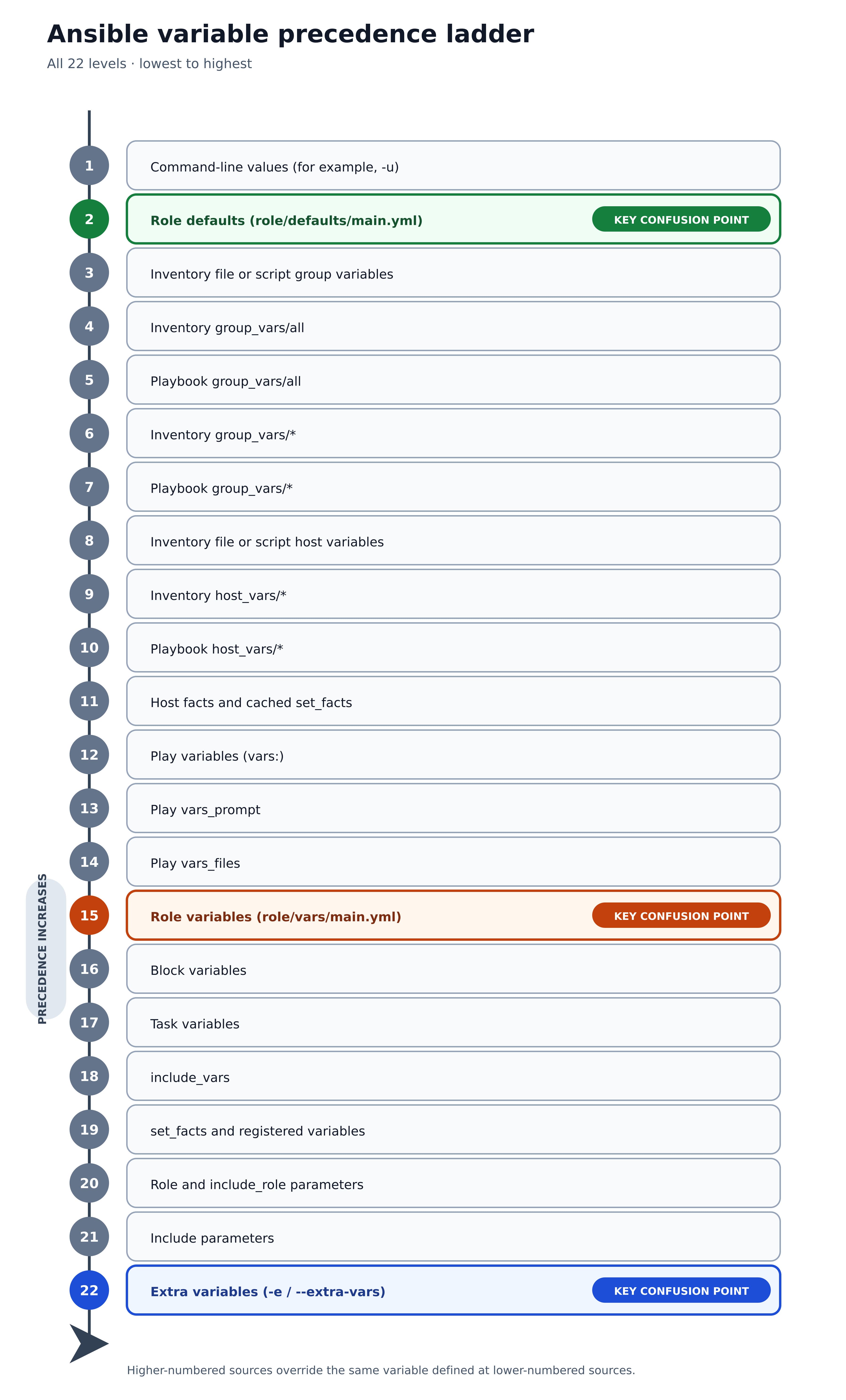
Three practical consequences are worth more than memorizing the list:
defaults/main.ymlin a role is item 2. Almost anything overrides it. That is exactly what you want for a role’s tunable settings.vars/main.ymlin a role is item 15. It beats inventory and play vars. Putting a value there and then trying to override it fromgroup_varswill not work, and this surprises people constantly.-eat item 22 beats everything. It is the right tool for a one-off override and the wrong tool for anything you need to repeat.
Ansible’s default hash behaviour is replace: redefining a dictionary replaces it wholesale rather than merging keys. A merge setting exists. Changing it globally alters how every variable in every playbook resolves, including in third-party roles that were never tested against it, so leave it alone and merge explicitly with the combine filter where you need it.
Handling undefined variables with default()
An undefined variable raises an error at template time. The default() filter supplies a fallback:
- name: Deploy with an optional override
  ansible.builtin.template:
    src: app.conf.j2
    dest: /etc/app/app.conf
    mode: "{{ file_mode | default('0644') }}"
default(omit) is different and more useful than it looks: it removes the parameter entirely, letting the module apply its own default rather than one you invented.
- name: Create a file, letting the module choose the owner if none is set
  ansible.builtin.file:
    path: /srv/app/config
    state: touch
    owner: "{{ file_owner | default(omit) }}"
Version note: from ansible-core 2.19 onward, values that resolve to omit are dropped immediately when loop items are templated. Writing | default(omit) explicitly is the form that behaves consistently, and it remains backward compatible with earlier versions.
Loops
An Ansible loop runs a single task once for each item in a list, with the current item exposed as the variable item. Loops remove the most common form of playbook duplication: four nearly identical tasks that differ by one word.
Since Ansible 2.5 the keyword is loop. The older with_items family still works and has not been removed, but loop is what new playbooks should use. Beyond a plain list, loop accepts anything that resolves to one: a dictionary converted with the dict2items filter, two lists combined with product for a nested loop, or a registered result from an earlier task. Two keywords control behaviour rather than input — loop_control renames item and tidies the output, while until retries the same task until a condition holds. The sections below work through each of these, and through what a registered variable actually contains when the task it captured was itself a loop.
The loop keyword
loop takes a list and runs the task once per element, exposing each element as item.
- name: Create application directories
  ansible.builtin.file:
    path: "/srv/app/{{ item }}"
    state: directory
    mode: "0755"
  loop:
    - releases
    - shared
    - shared/config
    - shared/logs
loop will not accept a string as input. Passing one is a frequent first error; wrap the value in a list or use a filter that produces one.
Before reaching for a loop, check whether the module already takes a list. ansible.builtin.apt does, and its documentation is explicit about the cost of getting this wrong: “When used with a loop: each package will be processed individually, it is much more efficient to pass the list directly to the name option.”
# Preferred — one transaction, one apt invocation
- name: Install web packages
  ansible.builtin.apt:
    name:
      - nginx
      - curl
      - ca-certificates
    state: present

# Works, but processes each package individually — the docs call the list form "much more efficient"
- name: Install web packages the slow way
  ansible.builtin.apt:
    name: "{{ item }}"
    state: present
  loop:
    - nginx
    - curl
    - ca-certificates
The package modules for other OS families behave the same way. This is the one place this article shows a non-Debian package module, for readers on RHEL or Fedora:
# RHEL / Fedora equivalent — shown once; every other example in this article uses apt
- name: Install web packages
  ansible.builtin.dnf:
    name:
      - nginx
      - curl
      - ca-certificates
    state: present
Every remaining example returns to ansible.builtin.apt.
Is with_items deprecated?
No. with_items is not deprecated. The official loops documentation states: “We have not deprecated the use of with_<lookup> - that syntax will still be valid for the foreseeable future.” The documentation recommends loop for most use cases, which is a different statement from deprecation, and the difference matters when you are deciding whether to rewrite a working codebase.
| Aspect | loop | with_items and other with_* |
|---|---|---|
| Status | Recommended for most cases | Valid, not deprecated |
| Added | Ansible 2.5 | Earlier |
| Behaviour with nested lists | Does not flatten | with_items flattens one level |
| Lookup plugins | Use filters or lookup() explicitly | Built into the keyword |
loop and with_<lookup> are mutually exclusive on the same task.
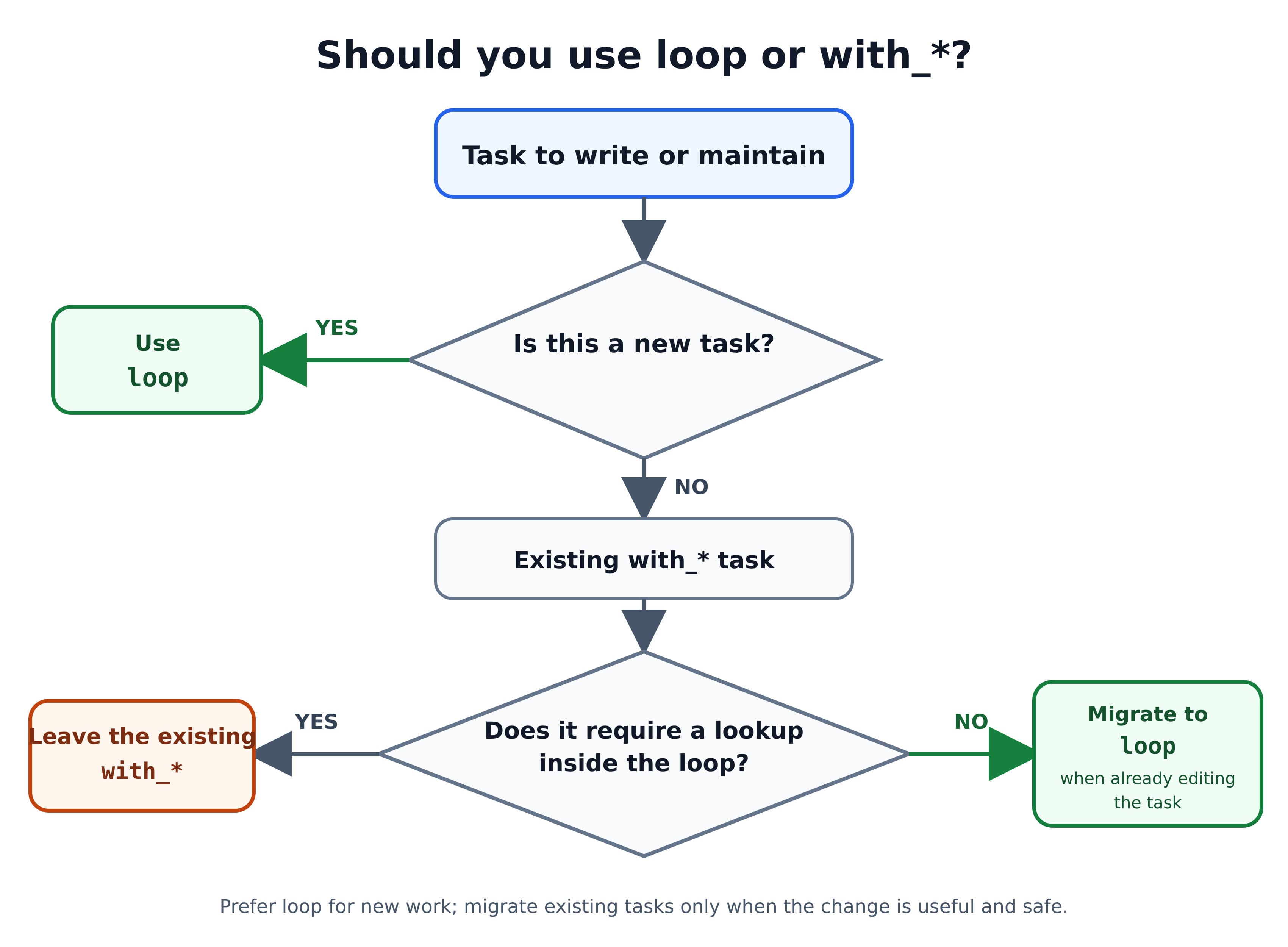
The nuance almost every tutorial gets wrong: the documentation advises that a with_* construct requiring a lookup inside the loop should not be converted to loop. Blanket “migrate everything to loop” advice will break those tasks. If a with_* task is working and depends on lookup behaviour, leaving it alone is a defensible engineering decision, not technical debt.
Recommendation for new code: use loop. For existing code: migrate when you are already touching the task, not as a standalone project.
Looping over dictionaries with dict2items
loop needs a list, and a dictionary is not one. The dict2items filter converts a dictionary into a list of key/value pairs.
vars:
  app_users:
    deploy: /srv/app
    backup: /srv/backups
    metrics: /var/lib/metrics

tasks:
  - name: Create users with their home directories
    ansible.builtin.user:
      name: "{{ item.key }}"
      home: "{{ item.value }}"
      state: present
    loop: "{{ app_users | dict2items }}"
Each item becomes a dictionary with exactly two keys, key and value. Writing item.name here is a common mistake and produces an undefined-attribute error.
Nested loops with the product filter
Ansible has no nested-loop keyword. The product filter simulates one by producing every combination of two lists.
vars:
  sites:
    - example.com
    - example.org
  subdirs:
    - public
    - logs

tasks:
  - name: Create a directory per site per subdirectory
    ansible.builtin.file:
      path: "/srv/www/{{ item[0] }}/{{ item[1] }}"
      state: directory
      mode: "0755"
    loop: "{{ sites | product(subdirs) | list }}"
Each item is a two-element list, addressed as item[0] and item[1]. Four tasks run here: two sites times two subdirectories. Combination counts multiply, so a product of two twenty-element lists is four hundred task executions — check the arithmetic before running it against production.
Controlling loop output with loop_control
By default a looped task prints the entire item on each iteration, which turns a loop over dictionaries into an unreadable wall of output. loop_control fixes that and adds several other capabilities.
- name: Deploy virtual host configurations
  ansible.builtin.template:
    src: vhost.conf.j2
    dest: "/etc/nginx/sites-available/{{ item.domain }}.conf"
    mode: "0644"
  loop: "{{ vhosts }}"
  loop_control:
    label: "{{ item.domain }}"
The output now shows just the domain instead of the full dictionary.
| Option | What it does |
|---|---|
label | Sets what appears in output for each iteration |
index_var | Names a variable holding the current index (0-indexed) |
pause | Seconds to wait between iterations |
extended | Exposes the ansible_loop object |
break_when | Exits the loop when an expression is true (ansible-core 2.18+) |
loop_control affects both loop and with_<lookup>, but it does not affect until.
With extended: true, an ansible_loop object becomes available with index, revindex, first, last, length, previtem, nextitem, and allitems:
- name: Report progress through the list
  ansible.builtin.debug:
    msg: "Processing {{ item }} ({{ ansible_loop.index }} of {{ ansible_loop.length }})"
  loop: "{{ target_hosts }}"
  loop_control:
    extended: true
Two indices exist and they differ. ansible_loop.index is 1-indexed; index_var is 0-indexed. Mixing them up produces off-by-one errors that survive review because both look correct.
The cost of extended is memory. The documentation notes that loop_control.extended uses more memory on the control node, because ansible_loop.allitems holds references to the full loop data for every iteration. On a large loop this is significant, and extended_allitems: false (ansible-core 2.14+) keeps the rest of the object while dropping the expensive part.
Retrying until something succeeds
until retries a task until a condition holds — the right tool for a service that takes a few seconds to start listening.
- name: Wait for the application to respond
  ansible.builtin.uri:
    url: "http://{{ inventory_hostname }}:8080/health"
    status_code: 200
  register: health_check
  until: health_check.status == 200
  retries: 10
  delay: 6
The defaults are 3 retries and a 5-second delay. until is a retry loop, not an iteration loop, and loop_control does not apply to it.
Failure mode worth naming: if the condition never becomes true, the task fails after the final retry with the last result attached. Setting retries high enough to mask a real outage turns a fast failure into a slow one — 10 retries at 6 seconds is a minute of waiting, which is a deliberate choice, not a free one.
Registering results from a loop
Registering a looped task does not produce one result. It produces a results attribute containing a list of every response.
- name: Check several configuration files
  ansible.builtin.stat:
    path: "/etc/app/{{ item }}"
  register: config_files
  loop:
    - app.conf
    - database.conf
    - logging.conf

- name: List the files that are missing
  ansible.builtin.debug:
    msg: "Missing: {{ item.item }}"
  loop: "{{ config_files.results }}"
  when: not item.stat.exists
  loop_control:
    label: "{{ item.item }}"
Note item.item in the second task: each entry in results carries the original loop element under the key item, so item.item is “the loop value that produced this result.” It reads strangely and is correct.
config_files.stat does not exist on a looped task. Reaching for it is one of the more common loop errors.
Handlers
A handler is a task that runs only when another task reports that it changed something. This is what stops a playbook from restarting a service on every run.
A task triggers one by name with notify, and the handler itself lives under a separate handlers: section of the play. Four rules govern the behaviour and account for nearly every surprise: a handler fires only when the notifying task reports changed, never on ok; it runs once no matter how many tasks notify it; it runs at the end of the play rather than at the point of notification; and handlers execute in the order they are defined, not the order they were notified. The sections below cover the basic pattern, those semantics in detail, grouping several handlers under one name with listen, forcing them to run early with meta: flush_handlers, and the specific reasons a handler you expected to fire silently did not.
notify and the basic handler pattern
---
- name: Configure nginx
  hosts: webservers
  become: true

  tasks:
    - name: Deploy the nginx configuration
      ansible.builtin.template:
        src: nginx.conf.j2
        dest: /etc/nginx/nginx.conf
        mode: "0644"
      notify: Restart nginx

  handlers:
    - name: Restart nginx
      ansible.builtin.service:
        name: nginx
        state: restarted
If the template renders identical content to what is already on disk, the task reports ok, no notification is sent, and nginx is not restarted. If the content differs, the task reports changed, the handler is queued, and nginx restarts once at the end of the play.
The string in notify must match the handler’s name exactly, including case. On current ansible-core a notify that matches nothing raises an error naming both places it looked — The requested handler ‘<name>’ was found in neither the main handlers list nor the listening handlers list. Older versions were inconsistent here and some silently ignored the mismatch, which is why stale advice about “silent” handler typos is still in circulation. If you are on a maintained version, a typo fails loudly rather than quietly.
How handlers actually behave
Three behaviours account for most handler confusion.
Handlers run at the end of the play, not at the point of notification. The order in which handlers are added to a play is: handlers from roles in the roles: section, then handlers from the handlers: section, then handlers from roles statically imported via import_role. Within a play the flow is pre_tasks, then handlers notified by pre_tasks, then roles and tasks, then post_tasks.
Notifying the same handler ten times runs it once. Ten tasks can all notify Restart nginx; nginx restarts one time.
Handlers execute in the order they are defined, not the order they were notified. The documentation states it directly: handlers are executed in the order they are defined in the handlers section, not in the order listed in the notify statement. This is the single most counterintuitive thing about handlers.
  handlers:
    - name: Reload systemd
      ansible.builtin.systemd_service:
        daemon_reload: true

    - name: Restart nginx
      ansible.builtin.service:
        name: nginx
        state: restarted
With these definitions, Reload systemd always runs before Restart nginx, regardless of which task notified which first. If your handlers have a required order, encode it in the definition order. Notification order will not save you.
Grouping handlers with listen
listen lets several handlers subscribe to one topic, so tasks notify a topic instead of a handler name.
  tasks:
    - name: Deploy the proxy configuration
      ansible.builtin.template:
        src: proxy.conf.j2
        dest: /etc/nginx/conf.d/proxy.conf
        mode: "0644"
      notify: restart web services

  handlers:
    - name: Restart nginx
      ansible.builtin.service:
        name: nginx
        state: restarted
      listen: restart web services

    - name: Restart the cache
      ansible.builtin.service:
        name: varnish
        state: restarted
      listen: restart web services
Notifying the restart web services topic executes every handler listening to it, regardless of how those handlers are named. This decouples tasks from handler names, which matters most in roles: a task can notify a topic without knowing what the role’s handlers are called.
Running handlers early with meta: flush_handlers
Sometimes end-of-play is too late — you need the service restarted before the next task can succeed.
  tasks:
    - name: Deploy the configuration
      ansible.builtin.template:
        src: app.conf.j2
        dest: /etc/app/app.conf
        mode: "0644"
      notify: Restart the application

    - name: Run any pending handlers now
      ansible.builtin.meta: flush_handlers

    - name: Verify the application is responding
      ansible.builtin.uri:
        url: http://localhost:8080/health
        status_code: 200
      retries: 5
      delay: 3
meta: flush_handlers triggers any handlers notified up to that point. Without it, the health check would run against the old configuration and either pass misleadingly or fail confusingly.
Why your handler didn’t run
A handler that silently does not run is one of the most reported Ansible problems, and it has a small number of causes.
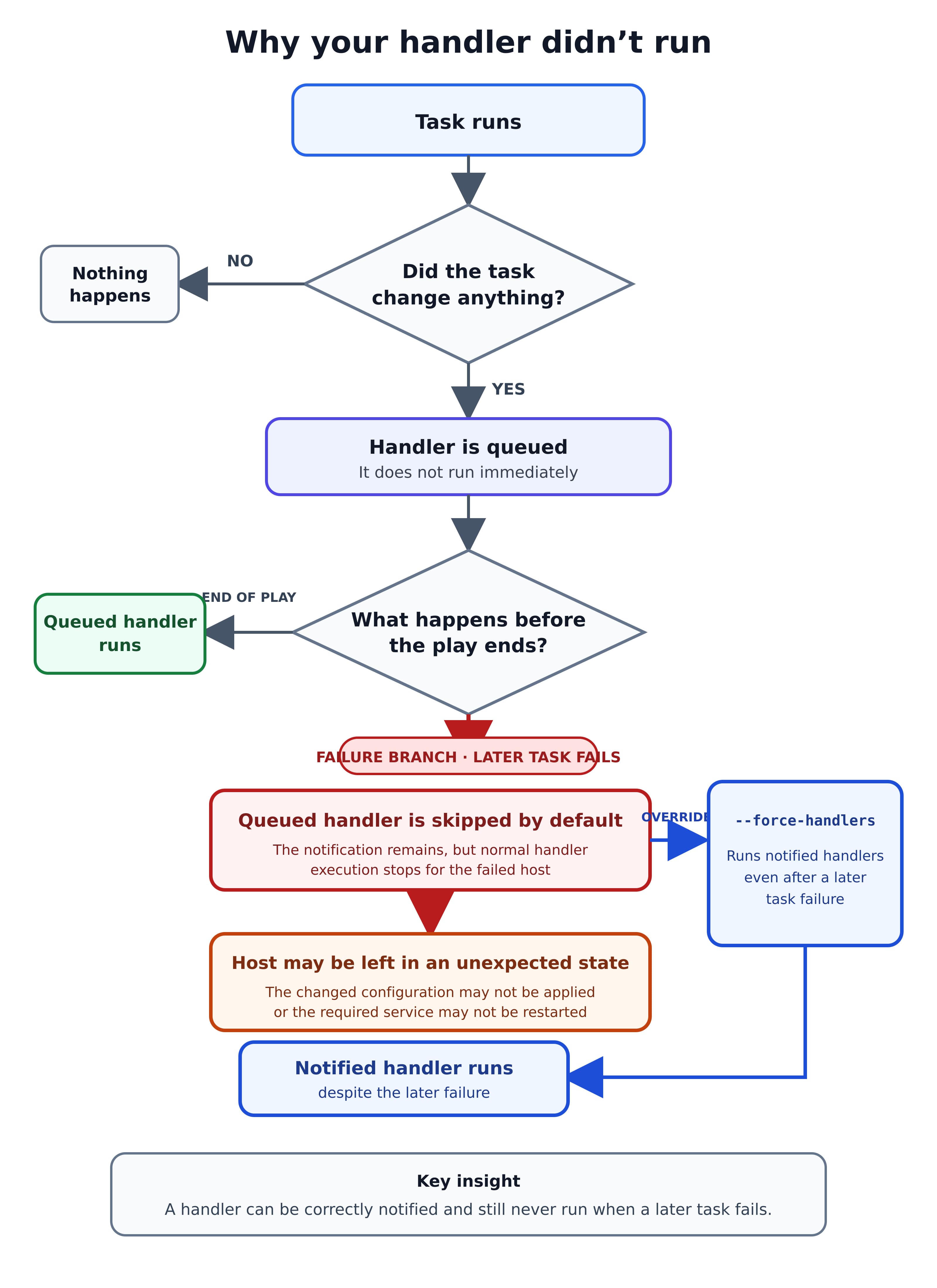
Cause 1 — a later task in the play failed. This is the big one, and it is documented on the error-handling page rather than the handlers page, which is why people do not find it. If a task notifies a handler and a task later in the same play fails, by default the handler does not run on that host, which, in the documentation’s words, “may leave the host in an unexpected state.” The documentation’s own example is exactly the dangerous case: a task updates a configuration file and notifies a service restart; a later task fails; the configuration file is changed but the service is never restarted. The host is now running old code against new config, and nothing in the output says so.
The fix is to force handlers, which can be set three ways:
ansible-playbook -i inventory.ini site.yml --force-handlers- name: Configure web servers
hosts: webservers
force_handlers: true[defaults]
force_handlers = TrueOne caveat the documentation attaches: certain errors can still prevent the handler from running, such as a host becoming unreachable. force_handlers reduces the exposure; it does not eliminate it.
Four more reasons a handler stays silent
Once a failing later task is ruled out, four smaller causes remain. Each is easier to diagnose than Cause 1 because each leaves a visible trace in the run output — a task reporting ok, a skipped handler, or an explicit name-matching error. Read them in order; they are roughly ordered by how often they turn out to be the answer.
Cause 2 — the task did not report changed. Handlers fire on change, not on success. A task reporting ok notifies nothing. This is correct behaviour that looks like a bug the first time a config file is already in the desired state.
Cause 3 — the name does not match. notify: restart nginx does not match a handler named Restart nginx. Matching is exact and case-sensitive. On current ansible-core this surfaces as an error rather than silence, so if your run completed cleanly and the handler simply did not fire, the cause is more likely one of the other four.
Cause 4 — a when condition on the handler. A handler with a false when is skipped even when notified.
Cause 5 — the notifying task is in a loop. Reported and reproduced behaviour, evidenced by open issues #22579 and #81950 in the ansible/ansible repository: notify inspects the task-level changed result and does not evaluate per-item changed state. A loop where only some items changed does not give you per-item handler notification. This is described here as known, reported behaviour with issues as evidence — not as documented, guaranteed behaviour.
Related, and worth stating carefully: handlers do not receive the notifying task’s loop context, so do not write a handler that references item. Pass what the handler needs through set_fact, or use listen with separate handlers instead. Community reports and forum threads consistently describe this, and issue #16872 describes loop variables being lost in handlers — but this article could not confirm it as a stated rule in the official documentation, so treat it as practical guidance rather than a documented guarantee.
Handler limitations worth knowing
- Handlers ignore tags. Running with
--tagsdoes not filter handlers the way it filters tasks. - A handler cannot run
import_roleorinclude_role. Refactoring a handler into a role call does not work. - Handler names should be globally unique across the play. Two handlers with the same name in different roles create ambiguity. To target a role’s handler specifically, notify it as
role_name : handler_name— with spaces around the colon, exactly as written. - Avoid variables in handler names. Handler names are templated early, so Ansible may not have a value available. Put the variable in the handler’s task parameters instead, and load values with
include_varsif needed.
Roles
A role is a directory structure that packages tasks, handlers, variables, templates, and files into a unit you can call from any playbook.
Ansible loads a role by convention rather than configuration: put a main.yml in tasks/ and it runs, put one in handlers/ and those handlers become available, and so on for defaults/, vars/, files/, templates/ and meta/. Only the directories you actually use need to exist. The distinction that causes the most trouble is defaults/ versus vars/: defaults sit near the bottom of the precedence list and are meant to be overridden, while role vars sit near the top and are not. A role can be called three ways — the roles: keyword, import_role (static, resolved at parse time) or include_role (dynamic, resolved at run time). The sections below cover each, plus scaffolding with ansible-galaxy, declaring dependencies, validating inputs with argument_specs, and roles distributed inside collections.
When to turn a playbook into a role
The documentation describes what roles are but deliberately avoids telling you when to use them. Here is an opinionated answer, offered as a recommendation rather than a rule:
Create a role when at least one of these is true:
- A second playbook needs the same tasks. Copy-paste is the signal.
- A single concern in your playbook exceeds roughly 50 lines of tasks.
- You want to hand one piece of the setup to a different team or repository.
- The tasks need their own default values that callers should be able to override.
Stay with a plain playbook when:
- It is under about 100 lines and does one thing for one project.
- It is genuinely a one-off.
The failure mode in each direction is real. Too few roles gives you a file nobody wants to edit. Too many gives you fifteen directories where a reader cannot find where anything happens, and a role called common that has become a junk drawer.
The role directory structure
roles/
└── nginx/
    ├── defaults/
    │   └── main.yml        # Low-precedence defaults — the role's public API
    ├── vars/
    │   └── main.yml        # High-precedence internals — hard to override
    ├── tasks/
    │   └── main.yml        # The work
    ├── handlers/
    │   └── main.yml        # Handlers this role can notify
    ├── templates/
    │   └── nginx.conf.j2   # Jinja2 templates
    ├── files/
    │   └── index.html      # Files copied verbatim
    ├── meta/
    │   ├── main.yml        # Dependencies and Galaxy metadata
    │   └── argument_specs.yml  # Input validation
    └── README.md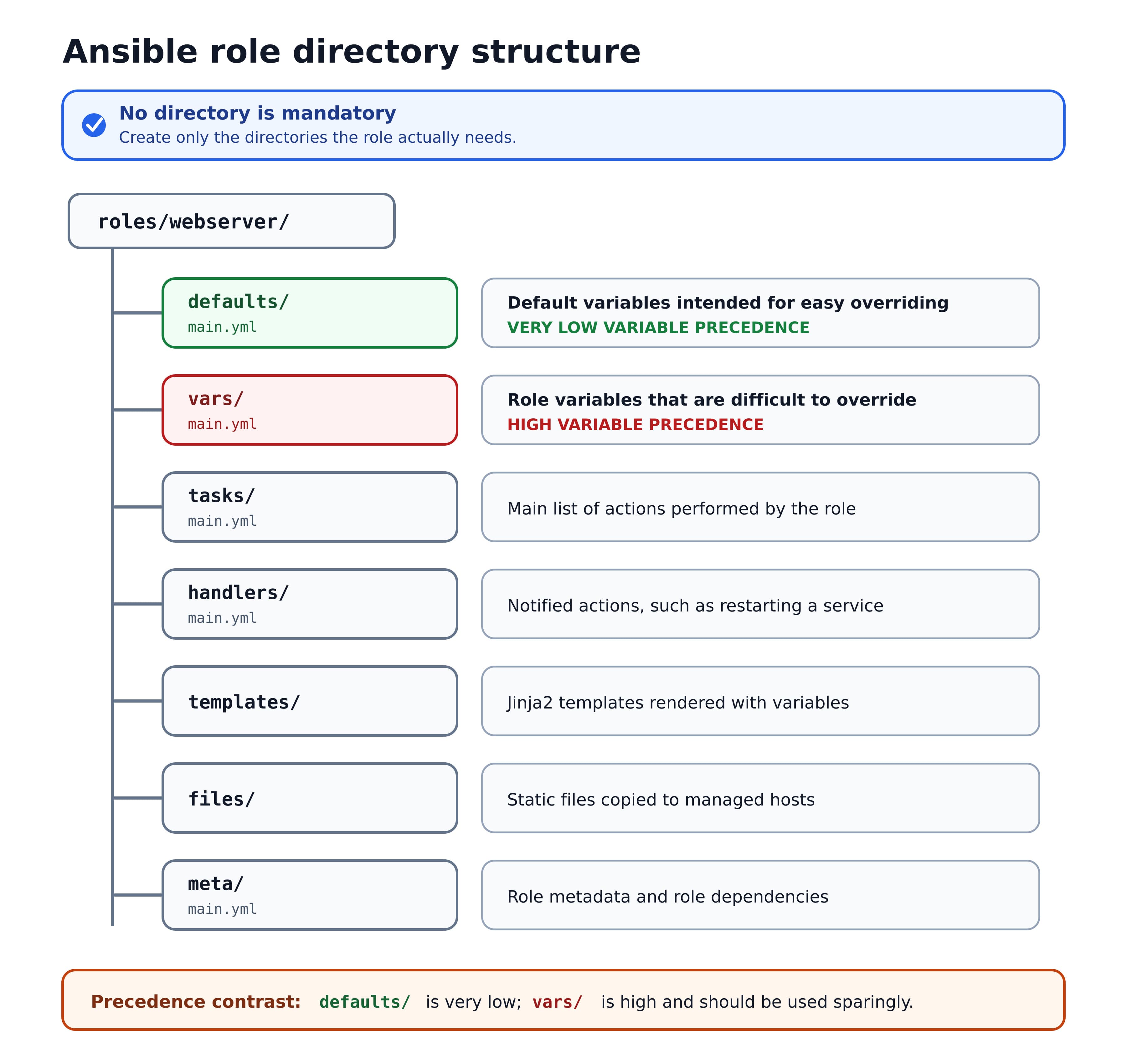
No directory is mandatory. The documentation states that none of these files is required and that you should include at least one of them and omit any the role does not use. A role with only tasks/main.yml is a legitimate role. The frequent implication in tutorials that you must scaffold all of them is wrong and produces roles full of empty directories.
Ansible looks in each role directory for main.yml, and also accepts main.yaml and main.
Ansible finds roles in this order: in collections if you are using them; in a roles/ directory relative to the playbook file; in the configured roles_path (default ~/.ansible/roles:/usr/share/ansible/roles:/etc/ansible/roles); and in the directory where the playbook file is located.
Scaffolding a role with ansible-galaxy
The ansible-galaxy CLI generates the skeleton:
ansible-galaxy role init nginxThis creates a directory named nginx in the current working directory. --init-path puts it somewhere else, which is what you want when your roles live in roles/:
ansible-galaxy role init nginx --init-path roles/--role-skeleton points at your own template directory if your team standardizes on a different layout.
A note on the command form: both ansible-galaxy init and ansible-galaxy role init appear in circulation, and older tutorials use the short form. The current CLI documentation organizes actions under two subcommands, ansible-galaxy collection and ansible-galaxy role, with init as an action of each. Use ansible-galaxy role init — it is unambiguous about what you are creating, and it is the form the current documentation presents.
The generated skeleton includes defaults/, files/, handlers/, meta/, tasks/, templates/, tests/, and vars/, plus README.md. tests/ contains an inventory file and test.yml.
Worth knowing: tests/ appears in the generated skeleton but is not part of the role directory list in the roles documentation. It is a scaffolding convenience for a minimal smoke test, not a canonical part of role structure. Teams doing real role testing generally use Molecule instead. Deleting tests/ from a generated role breaks nothing.
defaults/ vs vars/ — the distinction that matters most
Both hold variables. They sit at opposite ends of the precedence list, and that is the entire difference.
| Aspect | defaults/main.yml | vars/main.yml |
|---|---|---|
| Precedence | Item 2 — very low | Item 15 — high |
| Overridden by | Almost anything: inventory, group_vars, play vars, -e | Only block vars, task vars, include_vars, registered vars, role params, extra vars |
| Use for | Values callers are meant to change | Internals callers should not change |
| Think of it as | The role’s public API | The role’s private constants |
# roles/nginx/defaults/main.yml — callers override these freely
nginx_worker_processes: auto
nginx_port: 80
nginx_server_name: example.com# roles/nginx/vars/main.yml — internal, not meant to be overridden
nginx_config_path: /etc/nginx/nginx.conf
nginx_service_name: nginxThe recurring mistake: putting a tunable value in vars/ and then failing to override it from group_vars. Item 15 beats items 3 through 7. Nothing is broken; the precedence order is doing exactly what it says. Default to defaults/. Use vars/ only for values that would break the role if changed.
Version note: prior to ansible-core 2.15, vars: within the roles: section of a playbook were added to the play’s variables, making them visible to all tasks in the play before and after the role. On 2.15 and later they do not leak into the play’s variable scope. The behaviour is governed by DEFAULT_PRIVATE_ROLE_VARS. Tutorials written before 2.15 describe the old behaviour, and playbooks that relied on the leak will find those variables undefined on current versions.
Three ways to use a role
# 1. The roles: section — runs before tasks:
- name: Configure web servers
  hosts: webservers
  roles:
    - nginx

# 2. import_role — static, parsed at playbook parse time
- name: Configure web servers
  hosts: webservers
  tasks:
    - name: Apply the nginx role
      ansible.builtin.import_role:
        name: nginx

# 3. include_role — dynamic, resolved during execution
- name: Configure web servers
  hosts: webservers
  tasks:
    - name: Apply the nginx role only where required
      ansible.builtin.include_role:
        name: nginx
when: install_web_server | bool| Aspect | roles: | import_role | include_role |
|---|---|---|---|
| When resolved | Parse time | Parse time | Run time |
| Runs | Before tasks: | In task order | In task order |
| Tag behaviour | — | Tag applies to all tasks in the role | Tag applies only to the include statement |
when | Applied to every task in the role | Applied to every task in the role | Applied to the include as a whole |
Visible in --list-tasks | Yes | Yes | No — not known until run time |
The tag difference is the one that causes real confusion. Tagging an import_role tags every task inside it. Tagging an include_role tags only the include itself, so running with that tag runs the include, and then the role’s own tasks are filtered by their own tags.
Recommendation: use roles: for the straightforward case, include_role when application is conditional, and import_role when you want the role’s tasks visible to --list-tasks and tag selection.
Ansible executes each role only once per play, even if you define it multiple times — unless the parameters differ between definitions, or the role sets allow_duplicates: true in meta/main.yml. A role you intend to call twice with the same parameters will run once, silently.
Role dependencies in meta/main.yml
# roles/nginx/meta/main.yml
---
dependencies:
  - role: common
  - role: firewall
    vars:
      firewall_allowed_ports:
        - 80
        - 443
Ansible always executes roles listed in dependencies before the role that lists them. Dependencies deduplicate on the same rule as roles: they run once even if listed multiple times, unless the parameters, tags, or when clause differ between definitions.
The trade-off is worth stating. Dependencies make a role self-contained, which is good for sharing. They also make execution order implicit — a reader of your playbook sees roles: [nginx] and has no idea two other roles run first. For roles inside a single team’s repository, listing roles explicitly in the playbook is usually easier to follow. For roles published for others to consume, dependencies earn their cost.
Validating role inputs with argument_specs
Role argument validation catches a bad or missing input at the start of the role instead of five tasks in, with an error message you wrote.
# roles/nginx/meta/argument_specs.yml
---
argument_specs:
  main:
    short_description: Install and configure nginx
    options:
      nginx_port:
        type: int
        default: 80
        description: Port nginx listens on
      nginx_server_name:
        type: str
        required: true
        description: Server name for the virtual host
      nginx_worker_processes:
        type: str
        default: auto
        description: Value for the worker_processes directive
When an argument specification is defined, a validation task is inserted at the beginning of role execution to check supplied parameters against the spec. That task carries the always tag, so it runs unless explicitly skipped with --skip-tags.
One behaviour to know: type validation is coercive. A type: int option receiving the string "80" is converted to the integer 80 rather than rejected. Validation catches missing required arguments and genuinely wrong types; it is not a strict type gate.
This is close to absent from competing tutorials, and it is the cheapest reliability improvement available to a role that other people will call.
Roles inside collections
Roles increasingly ship inside collections rather than standalone. A role in a collection is addressed by its full path:
- name: Configure web servers
  hosts: webservers
  roles:
    - my_namespace.my_collection.nginx
One limitation: roles in collections do not support plugin embedding. A standalone role can carry library/ and module_utils/ directories; a role in a collection must use the collection’s own plugins/ structure to distribute plugins.
Putting it together: the example as a role
Refactoring the playbook from the top of this article gives:
site.yml
inventory.ini
roles/
└── nginx/
    ├── defaults/main.yml
    ├── tasks/main.yml
    ├── handlers/main.yml
└── templates/site.conf.j2# roles/nginx/defaults/main.yml
---
nginx_packages:
- nginx
- curl
nginx_site_name: example.com
nginx_worker_processes: 2# roles/nginx/tasks/main.yml
---
- name: Install web packages
ansible.builtin.apt:
name: "{{ nginx_packages }}"
state: present
update_cache: true
- name: Deploy the site configuration
ansible.builtin.template:
src: site.conf.j2
dest: "/etc/nginx/sites-available/{{ nginx_site_name }}.conf"
owner: root
group: root
mode: "0644"
notify: Restart nginx
- name: Enable the site
ansible.builtin.file:
src: "/etc/nginx/sites-available/{{ nginx_site_name }}.conf"
dest: "/etc/nginx/sites-enabled/{{ nginx_site_name }}.conf"
state: link
notify: Restart nginx
- name: Ensure nginx is running and enabled
ansible.builtin.service:
name: nginx
state: started
enabled: true# roles/nginx/handlers/main.yml
---
- name: Restart nginx
ansible.builtin.service:
name: nginx
state: restarted# site.yml
---
- name: Configure web servers
hosts: webservers
become: true
roles:
- nginxThe playbook is now five lines. Variables were renamed with an nginx_ prefix — a convention, not a requirement, and one that pays for itself the first time two roles both want a variable called port. Anything a caller should change lives in defaults/, so a second project overrides nginx_site_name from its own group_vars and reuses everything else.
Running playbooks safely
Ansible ships three checks that run before a playbook changes anything, and using them is the difference between a confident change and an incident. --syntax-check parses the YAML without connecting to any host. --check is dry-run mode: Ansible connects, evaluates each task and reports what would change, without changing it. Adding --diff shows the actual before-and-after content of files a task would rewrite. Two caveats matter in practice: check mode is only as honest as the modules involved, since a command or shell task is skipped rather than simulated, and a task whose input depends on an earlier task’s real output may report misleading results. Combine the three with --limit to rehearse against a single host first. The sections below show each flag and a checklist to run through before pointing a playbook at production.
Syntax checking and dry runs
# Parse the playbook without executing it
ansible-playbook -i inventory.ini site.yml --syntax-check

# List the tasks that would run
ansible-playbook -i inventory.ini site.yml --list-tasks

# Dry run — predict changes without applying them
ansible-playbook -i inventory.ini site.yml --check

# Dry run, showing file-level differences
ansible-playbook -i inventory.ini site.yml --check --diff

# Limit to one host first
ansible-playbook -i inventory.ini site.yml --limit web01.example.com
The documented descriptions, in the CLI reference’s own words:
| Option | Documented description |
|---|---|
--syntax-check | “perform a syntax check on the playbook, but do not execute it” |
--check (-C) | “don’t make any changes; instead, try to predict some of the changes that may occur” |
--diff (-D) | “when changing (small) files and templates, show the differences in those files; works great with –check” |
--force-handlers | “run handlers even if a task fails” |
--list-tasks | “list all tasks that would be executed” |
-v / --verbose | “Causes Ansible to print more debug messages.” Up to -vvvvvv; “A reasonable level to start is -vvv” |
Read --check precisely: it predicts some of the changes. Its accuracy depends on the modules involved, and this is where check mode misleads people.
Check-mode support is per-module and comes in three shapes. Modules with full support predict their changes. Modules with no check-mode support, per the documentation, “report nothing and do nothing” — they neither run nor tell you what they would have done. ansible.builtin.command and ansible.builtin.shell are documented as partial: the command itself is arbitrary and cannot be given check-mode semantics, so unless you supply creates or removes, the task is skipped in check mode rather than predicted.
The second-order consequence matters more than the rule. If a command task is skipped in check mode, every later task whose behaviour depends on that task’s result is now reasoning from a state that never happened, and a clean --check run can be describing a system that will not exist. Check mode is a strong signal, not a guarantee.
A checklist before you run against real servers
--syntax-checkpasses.--list-tasksshows the tasks you expect and nothing you do not.--check --diffagainst one non-production host, and you have read the diff.--limitto a single host for the first real run.- You know what happens if the run stops halfway — which is the
force_handlersquestion from the handlers section. - Secrets are in Ansible Vault or an external secrets manager, not in a variable file in Git.
- Someone can revert the change without you.
Common mistakes and how to fix them
Eight failures account for most of the time lost writing playbooks, and each has a specific cause rather than a general one. A handler that never runs is almost always a task reporting ok instead of changed, or a play that failed before handlers were reached. ‘item’ is undefined means item was referenced outside the task that defines it, or inside a nested loop where it was shadowed. A variable holding the wrong value is a precedence question, answered by the 22-level list above. A YAML error on a line that looks correct is usually an unquoted value starting with {{. The rest — a module that works for a colleague but not for you, a conditional that suddenly errors, role variables invisible elsewhere in the play, and facts that stop resolving as bare names — each have a cause worth knowing. Every entry below is drawn from behaviour in the official Ansible documentation or from reported issues in the ansible/ansible repository.
My handler didn’t run
Symptom: the task reported changed, the handler never appeared in the output.
Most likely cause: a task later in the same play failed. By default a notified handler does not run on a host where a later task failed.
Fix: run with --force-handlers, or set force_handlers: true on the play. Then check the other four causes in the handlers section: the task reported ok rather than changed, the notify string does not match the handler name exactly, the handler has a false when, or the notifying task is inside a loop.
'item' is undefined
Symptom: FAILED! => {"msg": "'item' is undefined"}.
Causes, in order of frequency: referencing item in a task that has no loop; referencing item in a handler, which does not receive the notifying task’s loop context; using item.name on a dict2items loop where the keys are key and value; or nested include structures where the inner loop variable shadows the outer one.
Fix: for handlers, pass the value with set_fact before notifying. For nested loops, set loop_var under loop_control to give the inner loop a distinct variable name.
My variable has the wrong value
Symptom: a variable holds a value you did not set, or ignores the value you did.
Cause: something higher in the 22-level precedence list is winning. The two frequent cases are a value in a role’s vars/main.yml (item 15) that inventory or group_vars (items 3–7) cannot override, and a set_fact (item 19) overwriting a play var.
Fix: print the value at the point of use with ansible.builtin.debug: var=my_variable to see what it actually is, then move the definition to the correct precedence level. Tunable values belong in defaults/.
YAML syntax error on a line that looks fine
Symptom: the playbook fails to parse, pointing at a line containing {{.
Cause: a value starting with {{ was not quoted, so YAML tried to parse the brace as a dictionary.
Fix: quote the whole expression — dest: "{{ base_path }}/config".
A module works for a colleague and not for me
Symptom: the same task name resolves to different behaviour on different machines.
Cause: a short module name resolving to different collections depending on what is installed.
Fix: use the FQCN. ansible.builtin.copy cannot resolve to anything else.
A conditional that used to work now errors
Symptom: a when: clause that ran fine previously now fails.
Cause: from ansible-core 2.19 onward, conditionals must produce a boolean result. Non-boolean conditionals that were previously tolerated now raise an error. ansible-core 2.19 also overhauled templating and introduced Data Tagging, and restricted templating so that only strings from a trusted source render as templates — multi-pass and embedded templating are no longer supported.
Fix: make the expression evaluate to a real boolean. when: my_var where my_var is the string "yes" should become when: my_var | bool. Note that from 2.19 the bool filter returns only True or False; other input warns now and becomes an error in ansible-core 2.23.
My role’s variables aren’t visible in the rest of the play
Symptom: a variable set in a role is undefined in a later task, in a playbook that worked on an older Ansible.
Cause: prior to ansible-core 2.15, vars: in the roles: section leaked into the play’s scope. On 2.15 and later they are contained to the role.
Fix: define the value at play level, or pass it explicitly. Do not restore the old behaviour through DEFAULT_PRIVATE_ROLE_VARS — you would be building on a setting whose default moved for good reasons.
Facts referenced as bare variables stop resolving
Symptom: a variable like ansible_distribution behaves inconsistently or triggers a deprecation warning.
Cause: ansible-core 2.20 deprecated INJECT_FACTS_AS_VARS, the setting that injects facts as top-level variables. It switches to False in ansible-core 2.24.
Fix: reference facts through the ansible_facts dictionary — ansible_facts['distribution'] rather than ansible_distribution. Making this change now is straightforward; making it after the default flips, across a large codebase, is not.
Best practices for structuring Ansible projects
Each of these is a recommendation with its cost named. A practice without a stated trade-off is an assertion.
Use FQCNs everywhere. Cost: verbosity. Benefit: no ambiguity, and roles that behave the same regardless of which playbook calls them. Worth it above roughly one collection.
Put tunable values in defaults/, internals in vars/. Cost: you must decide which is which. Benefit: callers can override what they should and cannot accidentally break what they should not.
Name variables with a role prefix — nginx_port, not port. Cost: longer names. Benefit: no collisions between roles in a shared variable namespace. Skip it only for genuinely single-project roles.
Keep plays short and push work into roles. Cost: more files, and indirection when reading. Benefit: reuse and testability. The counter-case is real — a 40-line playbook that does one thing does not need a role, and splitting it makes it harder to read.
Set changed_when on every command and shell task. Cost: a line per task. Benefit: honest change reporting, which is what handlers depend on. Without it, read-only commands report changed on every run and can trigger restarts that should not happen.
Decide your force_handlers position deliberately. Cost: with it on, handlers run even after a failure, which is not always what you want. Benefit: without it, a failed run can leave changed configuration and an unrestarted service. There is no universally correct answer; the wrong move is not having decided.
Validate role inputs with argument_specs.yml for roles others call. Cost: a file to maintain. Benefit: failures happen at role start with your error message instead of halfway through with a module’s. Skip for roles only you call.
Run --check --diff against one host before every production run. Cost: a few minutes. Benefit: you see the change before making it. Remember that check mode predicts only some changes.
Keep secrets out of variable files. Use Ansible Vault or an external secrets manager. Cost: key management. Benefit: your repository is not a credential store.
Pin what you depend on. Cost: deliberate upgrades instead of automatic ones. Benefit: a collection release does not change your playbook’s behaviour overnight. Record which ansible-core version your project targets, the way this article does.
Frequently asked questions
Ten questions that come up repeatedly when people start writing playbooks, answered directly. Each answer is deliberately short and self-contained, and each is covered at greater length in the relevant section above.
Is with_items deprecated in Ansible?
No. with_items is not deprecated. The official Ansible loops documentation states that the with_<lookup> syntax has not been deprecated and will remain valid for the foreseeable future. The documentation recommends loop for most new use cases, but recommending an alternative is not the same as deprecating the original. One important nuance: a with_* construct that requires a lookup inside the loop should not be converted to loop.
Why is my Ansible handler not running?
The most common cause is that a task later in the same play failed. By default, if a task notifies a handler and a later task in that play fails, the handler does not run on that host — which the official documentation warns "may leave the host in an unexpected state." Run with --force-handlers or set force_handlers: true on the play. Other causes: the notifying task reported ok rather than changed, the notify string does not exactly match the handler name, or the handler has a when condition that evaluated false.
Do handlers run in the order I notify them?
No. Ansible handlers execute in the order they are defined in the handlers section, not the order listed in notify statements. If handler A must run before handler B, define A above B. Notification order has no effect on execution order.
What is the difference between defaults/ and vars/ in an Ansible role?
Both hold role variables, and they differ in precedence. defaults/main.yml sits at item 2 of Ansible's 22-level precedence list — very low, so almost anything overrides it, which makes it right for values callers are meant to change. vars/main.yml sits at item 15 — high, so inventory and group_vars cannot override it, which makes it right for role internals. Put tunable settings in defaults/.
What is the difference between import_role and include_role?
import_role is static: the role is parsed when the playbook is parsed, its tasks appear in --list-tasks, and a tag applied to the import applies to every task in the role. include_role is dynamic: the role is resolved during execution, it supports when for conditional application, it does not appear in --list-tasks, and a tag applied to it applies only to the include statement, not to the role’s tasks.
Do I need to write ansible.builtin. in front of every module?
No, short names still work — content in the ansible.builtin collection is available by default without being listed. The official documentation nonetheless states it is preferable to use a module or plugin’s fully qualified collection name. The practical reason is collision avoidance once multiple collections are installed. Roles are the strongest case: a role does not inherit the calling playbook’s collections search order, so a role relying on short names can break when called from a different playbook.
How do I loop over a dictionary in an Ansible playbook?
Use the dict2items filter, because the loop keyword requires a list and will not accept a dictionary or a string. Writing loop: "{{ my_dict | dict2items }}" converts the dictionary into a list of entries, each exposing item.key and item.value. Referencing item.name instead of item.key is a common error and produces an undefined-attribute failure.
How do I test an Ansible playbook without changing anything?
Run ansible-playbook site.yml --check, which the documentation describes as making no changes and instead trying to "predict some of the changes that may occur." Add --diff to see file-level differences. Precede it with --syntax-check to catch parse errors. Check mode predicts only some changes — accuracy depends on the modules used, and command and shell tasks are skipped rather than predicted.
Which ansible-core version should I target?
As of 2026-08-25, ansible-core 2.21 is the current stable release, paired with the Ansible community package 14.x. ansible-core maintains three major releases at a time, so 2.20 (Ansible 13.x) and 2.19 (Ansible 12.x) are also within the maintained window, and 2.18 and earlier are end of life. Check yours with ansible --version. ansible-core 2.21 requires Python 3.12–3.14 on the control node and 3.9–3.14 on managed nodes.
Do I have to create every directory in a role?
No. The official roles documentation states that none of the role files are required and that you should include at least one role directory and omit any the role does not use. A role containing only tasks/main.yml is valid. Note that ansible-galaxy role init generates directories including tests/, which appears in the generated skeleton but is not part of the role directory list in the roles documentation — removing it breaks nothing.
Next steps
The four mechanisms in this Ansible playbook tutorial compose into one habit: describe the desired state, parameterize what varies, repeat without duplicating, act only on change, and package the result so the next project starts from it.
The primary references used throughout, all worth bookmarking:
- Ansible playbooks introduction
- Using variables
- Loops
- Handlers
- Error handling — including handler behaviour on failure
- Roles
- Using collections in playbooks
- Releases and maintenance
Last verified against ansible-core 2.21 on 2026-08-25.