
AI
MCP Vector Database: How Agents Query Vector Stores Without Glue Code
MCP vector database support, verified: Weaviate's built-in server (v1.37 preview, GA v1.38), its four tools, RBAC, multi-tenancy, and Pinecone, Qdrant and Milvus.
An MCP vector database is a vector database that speaks the Model Context Protocol directly, so an AI agent can list collections, inspect schemas, run hybrid search and write objects by calling named tools instead of going through an integration layer you wrote and maintain. Weaviate ships one inside the database binary. Most other vector stores are reached through a separate MCP server process.
That distinction — inside the binary versus a sidecar process — turns out to matter more than it sounds, and it is where most of this page goes.
Where these facts come from. Every version number, tool name, environment variable, RBAC permission and default on this page was read on 2026-09-18 from vendor documentation, GitHub release bodies or the MCP specification. None of it was executed. These are documentation-derived claims, not benchmark results or field reports, and where the documentation was silent or the sources disagreed I say so in the sentence rather than picking the tidier answer.
What a native MCP server for a vector database actually is
A native MCP server for a vector database is an MCP endpoint served by the database process itself, exposing database operations as MCP tools that any MCP client can discover at runtime. It replaces the hand-written REST or gRPC wrapper that normally sits between an agent’s tool-calling loop and the store, along with the tool-schema definitions, the argument marshalling and the auth plumbing that wrapper carried.
Here is the shape of what you probably built. An agent needs to search a collection. You wrote a function, gave it a JSON schema so the model could call it, mapped its arguments onto your vector client’s query builder, handled the error cases, threaded an API key through, and registered it in whatever framework you use. Then a colleague needed the same thing in a different service and wrote a second, slightly different version of it.
MCP removes the middle of that. The protocol is JSON-RPC 2.0 with a defined set of primitives — tools, resources and prompts — and a discovery call that lets a client ask a server what it offers rather than being told at build time. When the database itself implements the server side, the tool definitions ship with the database, versioned alongside the query engine they wrap.
The practical differences from a wrapper you maintain:
- Discovery is runtime, not build time. The client calls
tools/listand gets back the tool names, descriptions and JSON schemas. Your wrapper’s tool definitions live in your repo and drift from the database’s actual capabilities between deploys. - Auth is the database’s auth. In Weaviate’s case the MCP endpoint sits on the same port as the REST API and authenticates through the same API-key flow, so there is no second credential path to secure.
- Upgrades come with the database. When the vendor adds a tool, you get it by upgrading the database. When they change a parameter, the schema the client discovers changes with it.
- The cost is expressiveness. A wrapper you wrote can do anything the client library can do. A native server does what its tools do, and that surface is currently narrow. This is the real trade-off and the section on limits comes back to it.
One thing native MCP support does not change: the database still does the same work. Nothing about query latency, index behaviour or recall changes because the call arrived over MCP. It is an access path, not an engine.
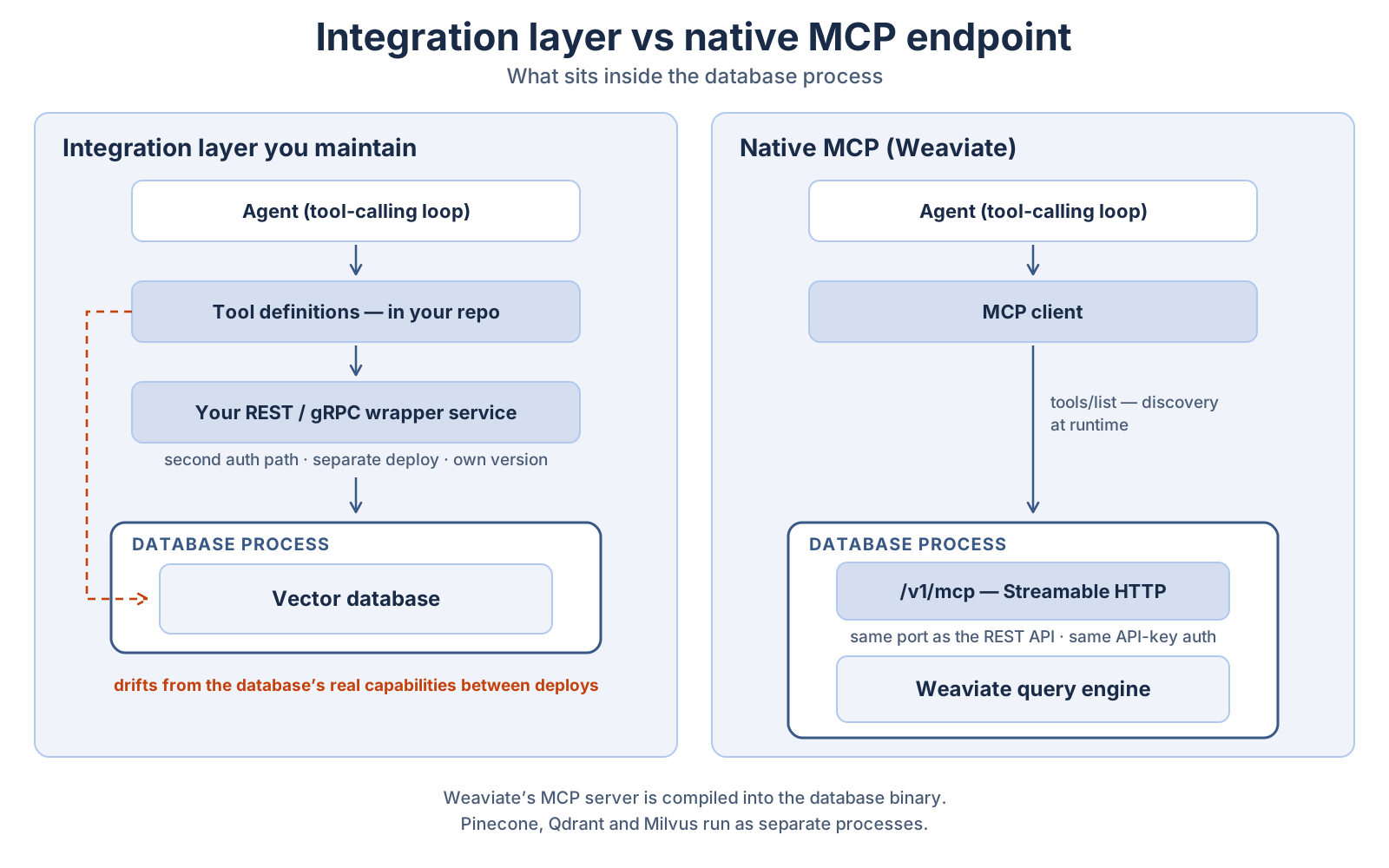
/v1/mcp endpoint ships inside the binary on the REST API’s port. This changes the access path, not the engine — latency, recall and index behaviour are unaffected.A note on the protocol version. The MCP specification’s current GA revision is 2026-07-28, which made the protocol core stateless, added cache metadata (ttlMs, cacheScope) to tools/list and the other list endpoints, and hardened the authorization flow — including deprecating Dynamic Client Registration in favour of Client ID Metadata Documents. Older servers implementing earlier revisions still work with clients that negotiate down. Whether a given vendor’s server implements the 2026-07-28 revision is a per-vendor question, and I have not verified it for any of the databases below; check the server’s own release notes rather than assuming.
Which vector databases have MCP servers, and who built them
Four major vector databases have vendor-maintained MCP servers as of September 2026. Only Weaviate’s runs inside the database process. Pinecone, Qdrant and Milvus are each reached through a separate server process that you launch and configure yourself, which means they are MCP integrations for a vector database rather than vector databases that speak MCP.
That distinction is not pedantry. A sidecar process is another thing to deploy, another place for credentials to live, and another component whose version can drift from the database’s. An in-process endpoint is a feature flag.
| Database | Built by | Runs where | Transport | Tool count |
|---|---|---|---|---|
| Weaviate | Weaviate (in weaviate/weaviate) | Inside the database binary, /v1/mcp | Streamable HTTP | 4 |
| Pinecone | Pinecone (pinecone-io/pinecone-mcp) | Separate Node process via npx | stdio (per documented client config) | 9 |
| Qdrant | Qdrant (qdrant/mcp-server-qdrant) | Separate Python process | stdio or HTTP (--transport) | 2 |
| Milvus | Zilliz (zilliztech/mcp-server-milvus) | Separate Python process via uv | stdio, SSE or Streamable HTTP | 12+ |
All four repositories sit in the vendor’s own GitHub organisation, so all four are vendor-built rather than community-built. Community servers for these databases also exist — sajal2692/mcp-weaviate is one — and are outside this comparison because they carry no vendor maintenance commitment.
Weaviate: the built-in server
Weaviate’s MCP server is compiled into the main weaviate/weaviate binary. There is nothing to install alongside it.
It arrived as a preview in v1.37.0, released 2026-04-16, under the release-note heading “Secure MCP Server (Preview)”. Weaviate’s own standalone MCP server repository — which previously held a separate Go implementation wrapping the REST API — now carries a deprecation notice pointing at the built-in server and names v1.37.1 as the version from which the preview is usable. The documentation marks the feature GA from v1.38, released 2026-06-05. If you are choosing a floor for a production deployment, v1.38 is the honest one; the v1.37 line is where it appeared, not where it stabilised.
Enable it with an environment variable:
# docker-compose.yml — Weaviate v1.38+
services:
  weaviate:
    image: cr.weaviate.io/semitechnologies/weaviate:1.38.15
    environment:
      MCP_SERVER_ENABLED: 'true'
      # Read-only unless you also set this. Default is false.
      MCP_SERVER_WRITE_ACCESS_ENABLED: 'false'
Both variables default to false, and both became runtime-configurable in v1.38 — on v1.37 a change means a restart. The endpoint is a Streamable HTTP endpoint at /v1/mcp on the same port as the REST API, which is 8080 by default for self-hosted instances. Authentication is the existing API-key flow, presented as a bearer token in the Authorization header.
The server exposes four tools:
| Tool | What it does | Key parameters |
|---|---|---|
weaviate-collections-get-config | Returns the schema configuration for collections | collection_name (optional — omit for all) |
weaviate-tenants-list | Lists a multi-tenant collection’s tenants with their activity status | collection_name (required) |
weaviate-query-hybrid | Hybrid vector + keyword search | query, collection_name, tenant_name, alpha, limit, target_vectors, target_properties, return_properties, return_metadata, filters |
weaviate-objects-upsert | Batch insert or update objects; only present when write access is enabled | collection_name, objects |
Four tools. That is the entire surface. There is no delete tool, no collection-creation tool, no aggregation tool. An agent connected to this server can read your schema, see your tenants, search, and write objects — and nothing else. Whether that is a limitation or a security feature depends on what you wanted it to do.
One configuration detail worth knowing because it is genuinely useful: MCP_SERVER_CONFIG_PATH points at a YAML or JSON file that overrides the tool descriptions the model sees. Tool descriptions are the entire mechanism by which a model decides whether to call a tool, so being able to write “this collection holds support tickets from 2024 onward; alpha below 0.3 works better for error-code lookups” into the description is the difference between an agent that queries well and one that guesses. Unlike the other two variables, this one is not runtime-configurable.
Pinecone: developer tooling, not a data plane
Pinecone’s MCP server is described in its own README as a Developer MCP Server, “intended for use with coding assistants”. That framing is accurate and worth taking literally. Its nine tools include search-docs for searching Pinecone’s documentation, alongside list-indexes, describe-index, describe-index-stats, create-index-for-model, upsert-records, search-records, cascading-search and rerank-documents.
It runs as a Node process (v20 or later) launched by npx @pinecone-database/mcp, configured in your MCP client’s config file with PINECONE_API_KEY in the environment.
The limitation is stated plainly in the README and constrains real use: only indexes with integrated inference are supported. Serverless indexes without integrated inference, standalone embeddings, and Pinecone Assistants are not. If your index takes pre-computed vectors — which is the common case for anyone who controls their own embedding model — this server cannot query it. Pinecone maintains a separate Assistant MCP server for knowledge-base retrieval.
Qdrant: two tools, and they are memory tools
Qdrant’s official server is the narrowest of the four and the most opinionated. It exposes exactly two tools — qdrant-store and qdrant-find — and its README describes it as “a semantic memory layer on top of the Qdrant database” rather than a general query interface.
qdrant-store takes information (a string), optional metadata and a collection_name. qdrant-find takes a query string and a collection_name. That is the whole API. Notably, the server does its own embedding: EMBEDDING_PROVIDER defaults to fastembed and EMBEDDING_MODEL to sentence-transformers/all-MiniLM-L6-v2. You are not passing vectors in; you are passing text and letting the server embed it.
That design makes it excellent for agent memory and unsuitable as an interface to a collection you populated with your own embedding pipeline, unless the model matches. QDRANT_READ_ONLY=true disables qdrant-store, which is the setting to reach for when the agent should not write. Both tool descriptions are overridable via TOOL_STORE_DESCRIPTION and TOOL_FIND_DESCRIPTION.
Milvus: the broadest surface, and the most to guard
Zilliz’s Milvus server has the widest tool surface of the four, spanning search, collection management and data operations: milvus_text_search, milvus_vector_search, milvus_hybrid_search, milvus_text_similarity_search, milvus_query, milvus_list_collections, milvus_create_collection, milvus_load_collection, milvus_release_collection, milvus_get_collection_info, milvus_insert_data and milvus_delete_entities.
It runs via uv and supports stdio (default), SSE and Streamable HTTP. Configuration is MILVUS_URI, an optional MILVUS_TOKEN and MILVUS_DB, and the README notes that a .env file takes priority over command-line arguments — a detail that will bite someone during an incident.
Breadth cuts both ways. milvus_create_collection, milvus_delete_entities and milvus_release_collection in an agent’s tool list mean a model that misreads a prompt can drop data or evict a collection from memory. There is no single read-only switch equivalent to Qdrant’s QDRANT_READ_ONLY or Weaviate’s write-access flag; scoping falls to the token you give it.
How agents discover schemas and inspect cluster state through MCP
An agent discovers a vector database’s schema by calling a schema-inspection tool at runtime and reading the JSON it returns, rather than being given a hard-coded description of your collections at build time. With Weaviate that is weaviate-collections-get-config, called with no arguments to get every collection or with collection_name to get one.
The sequence, for an agent connected to Weaviate v1.38 or later:
- The client connects to
/v1/mcpand callstools/list. It gets back the four tool names with their JSON schemas and descriptions. - The agent calls
weaviate-collections-get-configand learns which collections exist, what properties each has, and how each is configured. - If a collection is multi-tenant, the agent calls
weaviate-tenants-listfor that collection and gets the tenants plus their activity status. - The agent now has enough to construct a
weaviate-query-hybridcall with a realcollection_name, realtarget_propertiesand — where relevant — a realtenant_name.
Nothing in that flow required you to tell the agent anything about your data model. That is the meaningful change. A wrapper that hard-codes collection="SupportTickets" breaks the day someone renames the collection; an agent that reads the schema first does not.
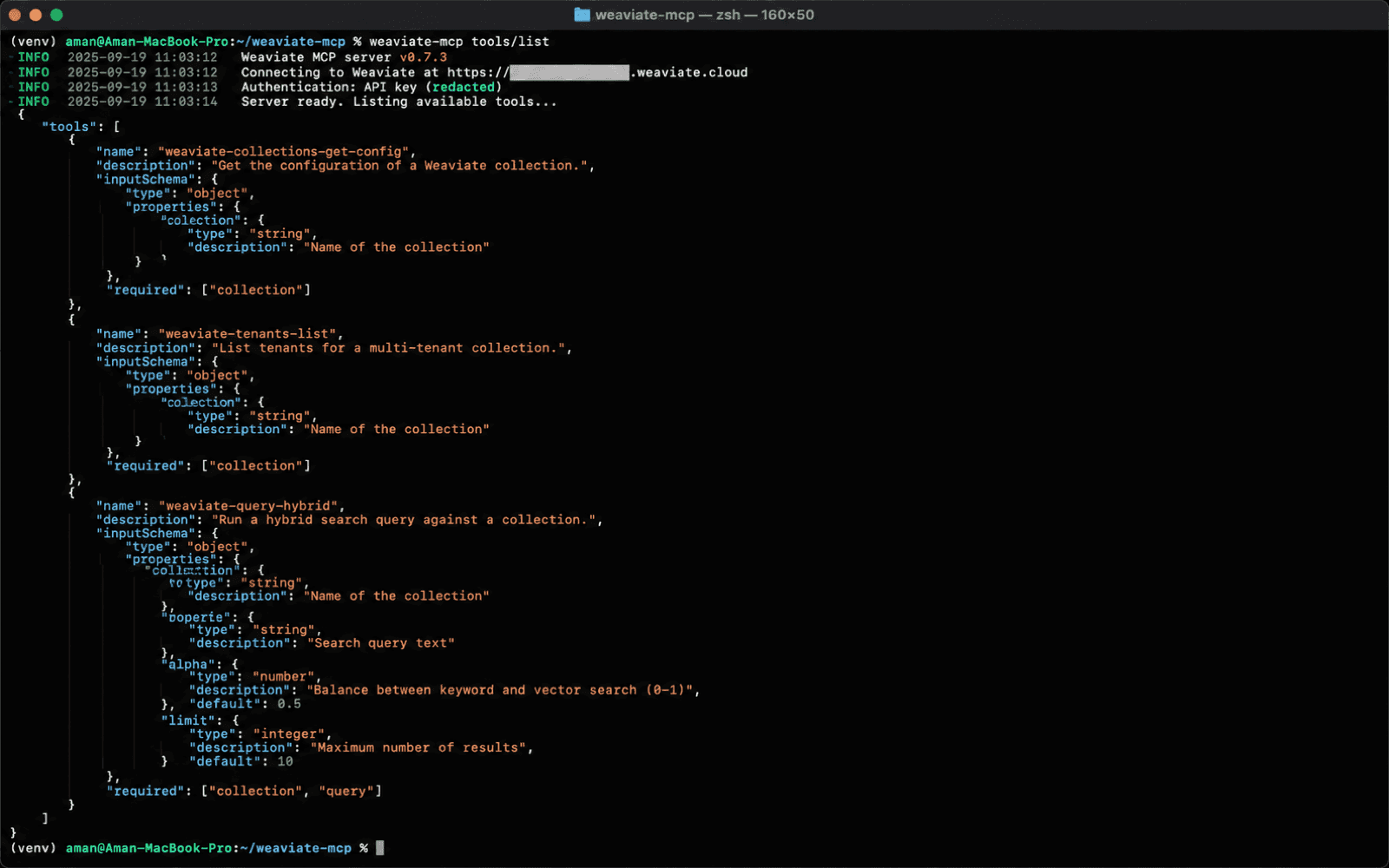
tools/list response: each tool arrives with a name, a description and an inputSchema the client reads at runtime. That is what replaces the tool definitions you would otherwise keep in your own repository. This figure is an illustration of that structure, not a captured session — as the note at the top of this article says, nothing here was run hands-on, and the authoritative tool names and parameters are the ones in the table and list above.Two caveats, both from the documentation rather than from optimism.
weaviate-tenants-list reports tenant activity using the legacy status names HOT, COLD and FROZEN, which map to the current ACTIVE, INACTIVE and OFFLOADED. An agent reasoning over that output, or a human reading a trace, will see the old vocabulary.
Collection-name matching is case-insensitive on the first character only. supportTickets will resolve to SupportTickets; supporttickets will not. Models generate identifiers in whatever case the surrounding text suggested, so this is a realistic failure and the error will look like a missing collection rather than a casing problem.
On “cluster state”. The intake framed this section as schema discovery and dynamic cluster management. Weaviate’s four MCP tools cover schema and tenant inspection. They do not expose node status, shard distribution, replication health, backup operations or any other cluster-management surface — those remain REST and gRPC operations. Milvus’s server goes further with milvus_load_collection and milvus_release_collection, which are genuine memory-state operations. But no vendor MCP server surveyed here lets an agent manage a cluster in the sense an SRE would use the word. Anyone promising that is describing a roadmap.
Multi-tenant filtering through MCP, and what a tenant actually is
In Weaviate, a tenant is not a filter value. Weaviate partitions a multi-tenant collection into shards where each shard holds the data for a single tenant, with its own dedicated vector index. Passing tenant_name to a query scopes it to one shard. A metadata filter, by contrast, searches a shared dataset and discards non-matching results afterwards.
I am separating these two mechanisms deliberately, because the intake’s phrase “multi-tenant semantic filters” compresses them into one thing and the compression causes real bugs. They have different isolation properties and different performance characteristics:
- Tenant scoping is structural. The query runs against one tenant’s index. Data for other tenants is not traversed, and deleting a tenant deletes its objects. Weaviate’s documentation describes each tenant as responding “as if it was the only user on the cluster”.
- Metadata filtering is a query-time predicate over a shared index. It narrows results; it does not partition storage.
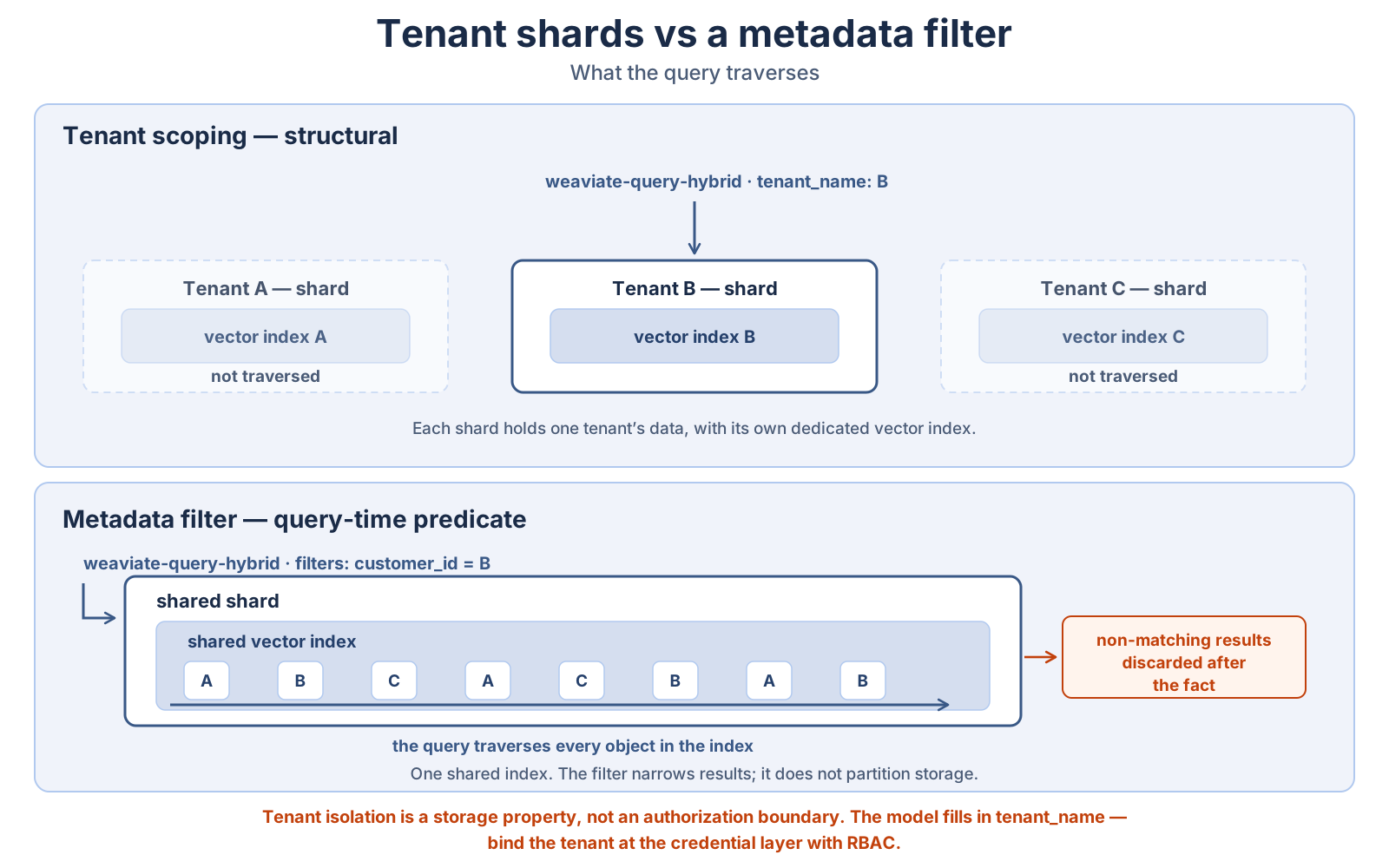
tenant_name selects which index the query reads, while filters narrows results inside whatever the query already traverses. They compose on weaviate-query-hybrid, but they are not substitutes: a forgotten filter leaks, and a forgotten tenant reads nothing. Neither is an authorization boundary.Getting this wrong in the direction of “I’ll just add a customer_id filter” means your isolation guarantee is only as good as every query that ever forgets the filter. Getting it wrong in the other direction — a tenant per user on a million-user app — creates a shard-count problem.
Through MCP, both are available on weaviate-query-hybrid and they compose. tenant_name selects the shard; filters applies predicates within it; alpha sets the vector-versus-keyword balance for the hybrid search. weaviate-objects-upsert also accepts tenant_name, so writes land in the right shard.
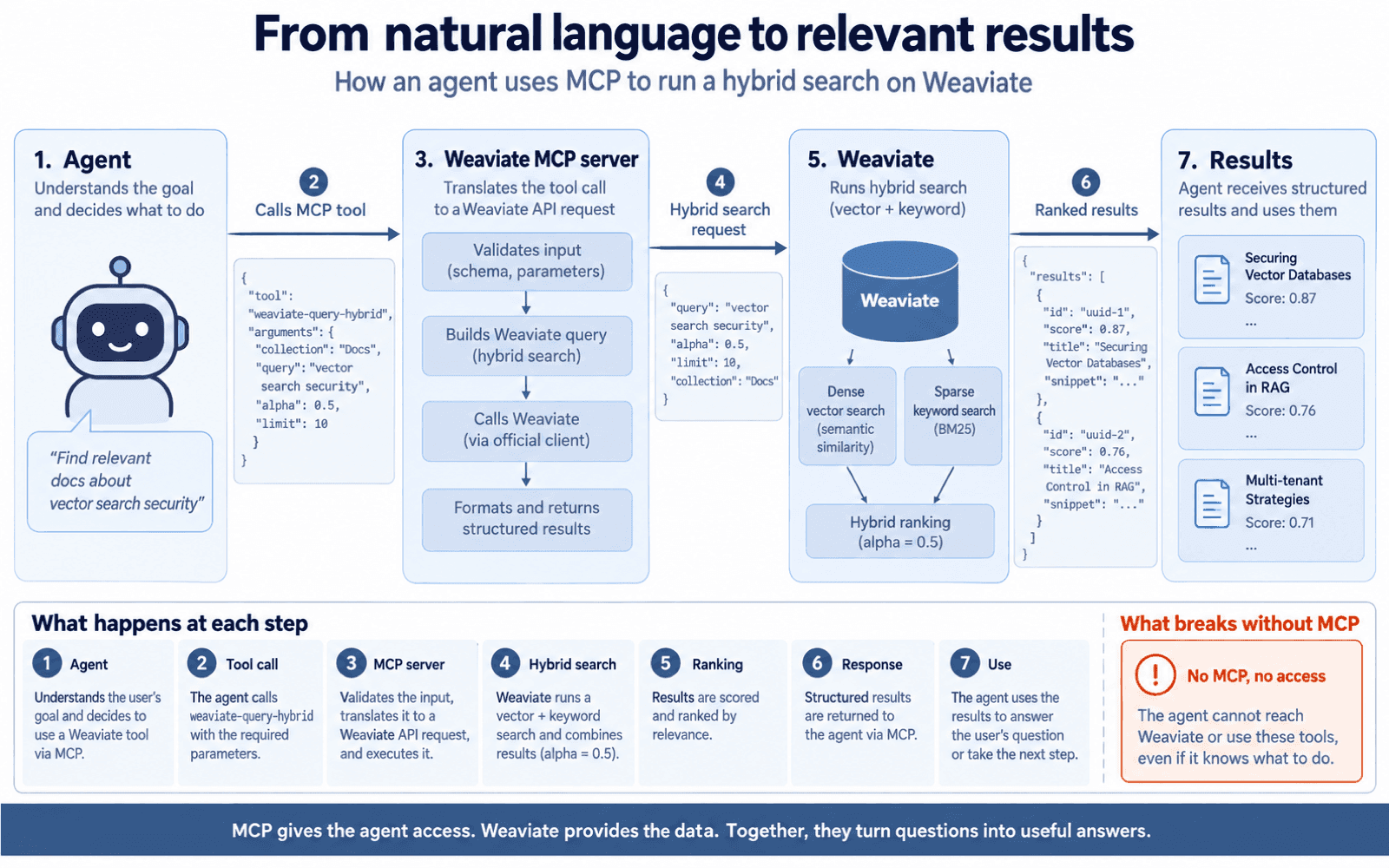
weaviate-query-hybrid call: the agent supplies parameters, the server validates them against the schema it published, and alpha balances the dense and sparse halves of the ranking. For where the server sits relative to the database process — the distinction this article turns on — see the first figure above, which is the authority on that point.What this removes is the endpoint you would otherwise have written. In the wrapper version, supporting “search tenant X, restricted to documents after date Y, weighted toward keyword match” means either a parameterised endpoint you designed up front or a new endpoint per query shape. Through MCP the parameters are on the tool, the model fills them from the request, and the combinations you never anticipated work without a deploy.
The honest limit: the model is choosing tenant_name. If the tenant identifier reaches the model from user-controllable text, the model can be talked into a different tenant. Tenant isolation is a storage property, not an authorization boundary, and MCP does not make it one. Bind the tenant at the credential layer, through an RBAC role scoped to that tenant’s data, rather than trusting the parameter the model filled in.
Does native MCP support add new security risks?
Yes. Giving an agent a direct write path to a vector database adds real risk, and the specific exposure is that tool-calling decisions are made by a model that reads untrusted text. Weaviate’s built-in server is designed against this — write access is off by default and MCP operations are governed by RBAC permissions — but the controls are yours to configure and the default-deny posture is the only thing protecting you out of the box.
The MCP specification is direct about this. It states that tools “represent arbitrary code execution and must be treated with appropriate caution”, that descriptions of tool behaviour “should be considered untrusted, unless obtained from a trusted server”, and that hosts must obtain explicit user consent before invoking any tool. It also acknowledges that MCP “cannot enforce these security principles at the protocol level” — enforcement is the implementor’s job.
What Weaviate gives you
Weaviate’s RBAC has been generally available since v1.29 (it was a technical preview in v1.28). MCP access is governed by dedicated permissions on top of it:
| Access | MCP permission | Plus the underlying data permissions |
|---|---|---|
| Read | read_mcp | read_collections, read_data, read_tenants as needed |
| Write | create_mcp, update_mcp | create_data, update_data |
The two-layer design is the useful part: read_mcp grants use of the MCP endpoint, and the ordinary data permissions still decide what that principal can see through it. A role with read_mcp but no read_data on a collection cannot read that collection over MCP. Weaviate also ships a predefined viewer role for read-only access.
Combined with MCP_SERVER_WRITE_ACCESS_ENABLED defaulting to false — which removes weaviate-objects-upsert from the tool list entirely rather than merely rejecting the call — an agent that should only read is genuinely constrained by two independent mechanisms.
What you still have to think about
These are the concerns I would raise in a design review, and they are not Weaviate-specific:
- The agent’s credential is the agent’s authority. Every MCP call an agent makes carries the API key you configured it with. If that key maps to a role with write permission on every collection, then prompt injection in a retrieved document is a write primitive. Issue a per-agent key bound to a role scoped to the collections and tenants that agent needs.
- Tenant selection is a model decision, not an auth decision. Because
tenant_nameis a tool parameter, the model picks it. In a system where users share an agent, bind the tenant to the credential through RBAC rather than trusting the parameter. - Upsert replaces whole objects. Weaviate’s documentation is explicit that
weaviate-objects-upsertreplaces the entire object; a partial update requires sending the complete object. An agent that constructs an object from partial context silently drops the properties it did not include. This is a data-integrity failure that leaves no error behind, which makes it worse than a crash. - Auto-schema will create collections you did not ask for. If auto-schema is not disabled, a misdirected upsert to a mistyped collection name creates that collection rather than failing. Disable it on any instance an agent can write to.
- Tool descriptions are an injection surface. The MCP spec’s warning about untrusted tool descriptions applies to Weaviate’s
MCP_SERVER_CONFIG_PATHfile too — it is a file whose contents go into a model’s context and influence tool selection. Treat it as code: review it, version it, do not let it be writable by anything that is not. - Timeouts fail as
503, not as a partial result. On Weaviate Cloud, requests exceeding roughly 60 seconds return HTTP503. An agent retrying a long query will retry into the same wall. Caplimitand constrain the query rather than raising a timeout you do not control.
My recommendation, and it is a recommendation rather than a fact: run agents read-only against production vector stores until you have traced a month of their tool calls. This is the same blast-radius argument that applies to agents acting on production infrastructure generally, and a vector store holding retrieval context deserves the same caution as a deployment pipeline. MCP_SERVER_WRITE_ACCESS_ENABLED=false plus a viewer-scoped key costs nothing and removes the entire class of write incidents while you learn what your agent actually does.
What native MCP does not replace
MCP support does not replace your vector database client, and on current tool surfaces it does not come close.
Weaviate’s four tools cover schema inspection, tenant listing, hybrid search and upsert. Everything else your application does — creating collections, configuring vectorizers, deleting objects, aggregations, batch imports at ingestion scale, backups, replication, near_vector queries with vectors you computed yourself — goes through the REST, gRPC or client-library paths it always did. The MCP endpoint is an additional access path for agents, sitting beside the existing ones.
Nor does it remove the design work. Chunking strategy, embedding-model choice, index configuration, retrieval evaluation and the decision about what belongs in a vector store at all are untouched by how an agent reaches the store. MCP removes integration code. It does not remove retrieval engineering, and a badly designed corpus queried over MCP returns the same bad results faster.
The realistic scope of what it removes: the tool-definition layer, the argument marshalling, the second auth path, and the drift between your wrapper and the database. In a codebase with three services each carrying their own vector wrapper, that is worth having. It is not an architecture change.
Where this sits on the maturity curve. Weaviate’s built-in server reached GA in v1.38, released 2026-06-05. The other three vendor servers are separate processes rather than native database features. A feature that went GA in June 2026 has had one quarter of production exposure, and anyone describing native MCP support for vector databases as settled is describing something that young.
The storage layer is moving too. While MCP changes how agents reach a vector store, a separate shift is changing where the vectors live at all: Milvus 3.0, GA in July 2026, can query Parquet and Iceberg tables in place instead of requiring a second copy inside the database. Lake-native vector databases and the double-ETL problem covers what that removes, what it costs, and why it is a pilot rather than a migration today.
Frequently asked questions
What is an MCP vector database?
An MCP vector database is a vector database that exposes its operations as Model Context Protocol tools, letting an AI agent discover and call them directly instead of going through a custom REST or gRPC integration layer. Weaviate implements this inside the database binary from v1.37.0 (preview), GA from v1.38 (released 2026-06-05). Pinecone, Qdrant and Milvus are reached through separate vendor-maintained MCP server processes.
Which vector databases have an official MCP server?
As of September 2026, Weaviate, Pinecone, Qdrant and Milvus all have MCP servers maintained in the vendor’s own GitHub organisation. Weaviate’s runs inside the database process at /v1/mcp. Pinecone’s (pinecone-io/pinecone-mcp), Qdrant’s (qdrant/mcp-server-qdrant) and Milvus’s (zilliztech/mcp-server-milvus) each run as a separate process you deploy and configure.
Which Weaviate version has the built-in MCP server?
Weaviate’s built-in MCP server shipped as a preview in v1.37.0, released 2026-04-16, and the documentation marks it generally available from v1.38, released 2026-06-05. Weaviate’s deprecated standalone MCP repository names v1.37.1 as the preview baseline. Enable it with MCP_SERVER_ENABLED=true; it serves Streamable HTTP at /v1/mcp on the REST API port.
What tools does the Weaviate MCP server expose?
The Weaviate built-in MCP server exposes four tools: weaviate-collections-get-config (schema inspection), weaviate-tenants-list (tenants and their activity status), weaviate-query-hybrid (hybrid vector and keyword search) and weaviate-objects-upsert (batch insert or update). The upsert tool appears only when MCP_SERVER_WRITE_ACCESS_ENABLED is set to true; it defaults to false.
Is it safe to let an agent write to a vector database over MCP?
Letting an agent write to a vector database over MCP is safe only under explicit constraints, because the model deciding to call a write tool may be reading untrusted text. Weaviate disables write access by default and governs MCP with RBAC permissions (read_mcp, create_mcp, update_mcp) layered on ordinary data permissions. Scope each agent’s API key to one role, disable auto-schema, and note that upsert replaces whole objects rather than merging fields.
Does MCP make my RAG pipeline faster?
No. MCP is an access path, not a query engine — retrieval latency, recall and index behaviour are unchanged by whether a query arrives over MCP, REST or gRPC. What native MCP support removes is integration code: tool definitions, argument marshalling, a second auth path, and the drift between a hand-written wrapper and the database’s real capabilities.
Can an agent manage a vector database cluster through MCP?
Not meaningfully, on the vendor MCP servers available in September 2026. Weaviate’s four MCP tools cover schema and tenant inspection, not node status, shard distribution, replication or backups. Milvus’s server exposes collection load and release operations, which affect memory state. Cluster administration remains a REST, gRPC or operator concern across all four databases surveyed.
Where to go from here
If you maintain a vector wrapper and run Weaviate, the cheapest useful experiment is a read-only one: set MCP_SERVER_ENABLED=true on a v1.38+ instance, leave write access off, point an MCP client at /v1/mcp with a viewer-scoped key, and compare the tool call an agent makes against the endpoint you wrote. That comparison tells you more about whether the four tools are sufficient for your workload than any article can.